Hi there, Dong. Let's make sure to change your billing schedule for your subscription.
Before doing so, please ensure you are logged in as Primary Administrator on your account to access the billing settings.
Once done, follow the steps below to modify your billing schedule:
- Sign in to your QuickBooks Online account.
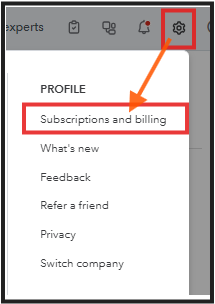
- Go to Gear icon and select Subscriptions and billing.
- Select Subscribe and complete all the details required.
- In the subscription summary, choose Annual Billing or Monthly Billing.
- Select Subscribe, then select Done.
I'll also share this article if you need to change your payment method or QBO plan: Manage billing, payment, and subscription info.
It will be my pleasure to assist you further with guidance on managing your QuickBooks subscription.


