Hello, Babutv2000.
I see that you experienced an issue with your RBC account in QuickBooks Online. The update confirms successful verification; however, transactions have not been downloaded since October 25, 2025.
When you click the Update button, QBO refreshes your RBC bank feed and downloads new transactions. Since no new transactions were added, it means that QuickBooks didn't find any transactions to import after the successful connection.
With that, I recommend logging in to your RBC online banking portal to inquire about any updates or ongoing issues on their end that might be preventing transactions from updating and syncing with QuickBooks.
In the meantime, we can manually upload your transactions using a CSV file format.
Here's how:
- Log in to QuickBooks Online.
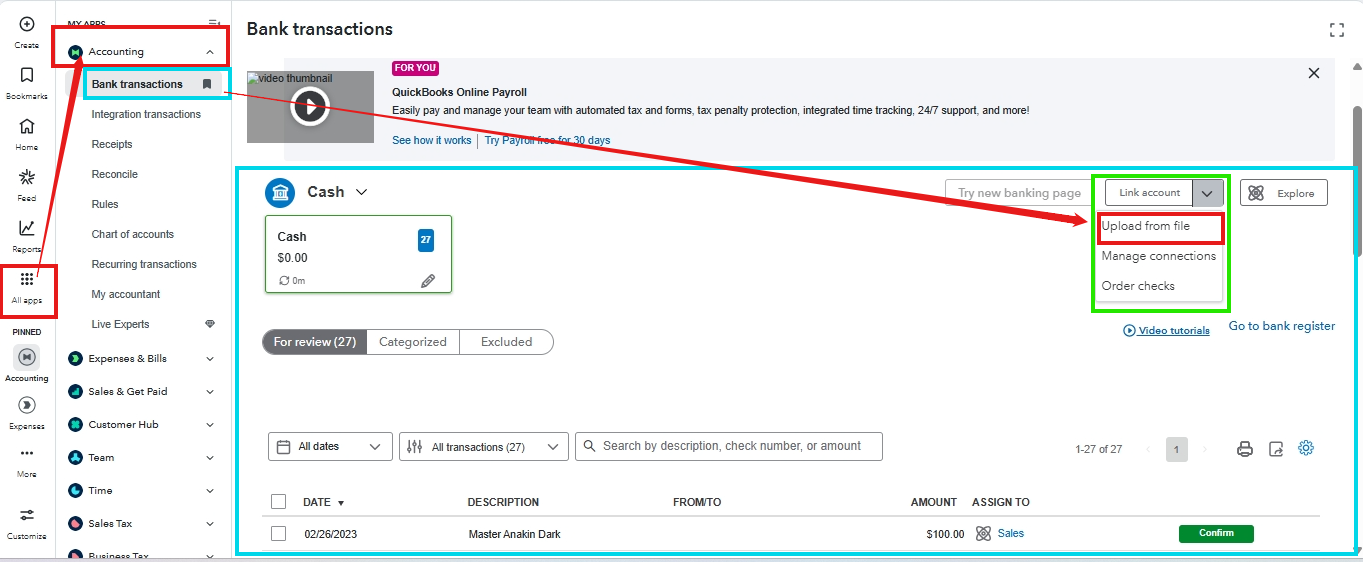
- Navigate to All Apps and click the Accounting tab, then choose the Bank Transactions section.
- Please select the blue tile corresponding to the account into which you are uploading the transactions. Click on the ▼ dropdown menu beside Link account and then Upload From File.
- Click on Browse to select the CSV file downloaded from your bank, then click Continue. Match the columns in the file with the corresponding fields in QuickBooks, and then proceed. Select the transactions you would like to import and continue.
- Hit Yes and Done.
When you're ready to match and categorize your transactions. In addition, you may prefer to set up Bank Rules. QuickBooks will automatically categorize the transactions for you based on the rules you set.
We are still willing to assist with these banking concerns, Babutv2000. Let me know in this thread.


