Hello there, Marianne.
The reason why you are unable to view transactions before 2023 in your bank register is related to how the date filter is set up. Currently, the filter is designed to go back up to two years. If you select a date older than that, the system will give you a warning, which is why those dates are crossed out and do not appear when sorted.
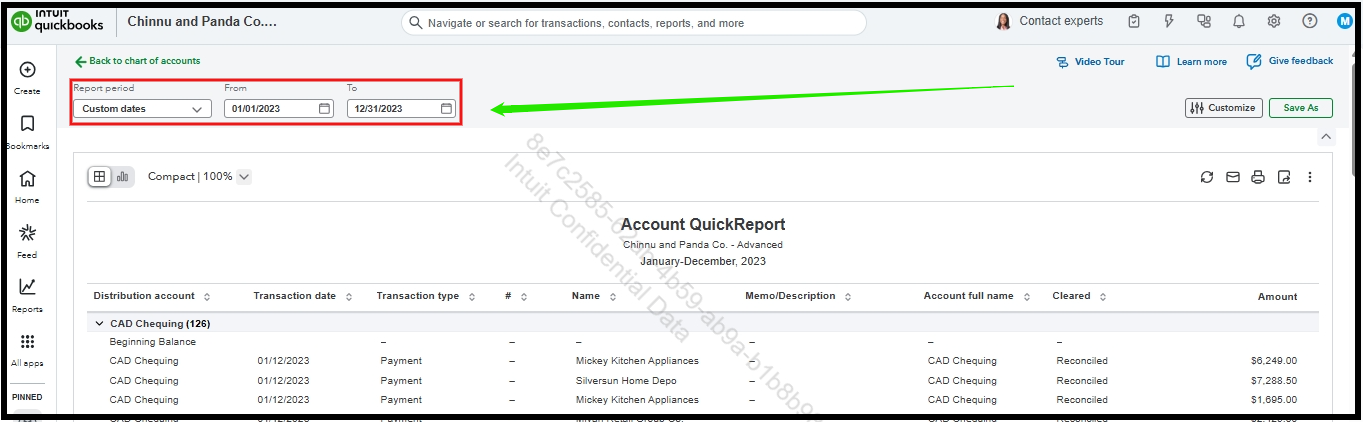
In the meantime, you can run a report from the Chart of accounts. By filtering out the 2023 transaction dates in the report, you should be able to view the older transactions that you are looking for.
Here's how:
- Go to the gear icon and select Chart of accounts.
- Locate the bank account for which you want to view transactions.
- Click the drop-down arrow next to it and choose Run report.
- In the report settings, set the Report period to custom dates for 2023.
If you have any further questions or concerns, please feel free to leave a comment below.


