Absolutely, I can walk you through the steps, Kreller.
Creating a final paycheque is the same as you would normally do in QuickBooks. Let's ensure you've already set up pay types for that employee. If they are marked as Terminated, we first need to un-terminate them to remove the termination date before entering the final paycheck.
After that, you have two ways to create a final paycheck in your QuickBooks.
For Scheduled Payroll (Give the final paycheck as part of your regular payroll schedule.) Here's how:
- Go to the Payroll tab, then Employees, and select Run Payroll.
- Choose the employee you want to pay.
- In the Actions column, click the Edit paycheque option to enter all the amounts and details, then Save.
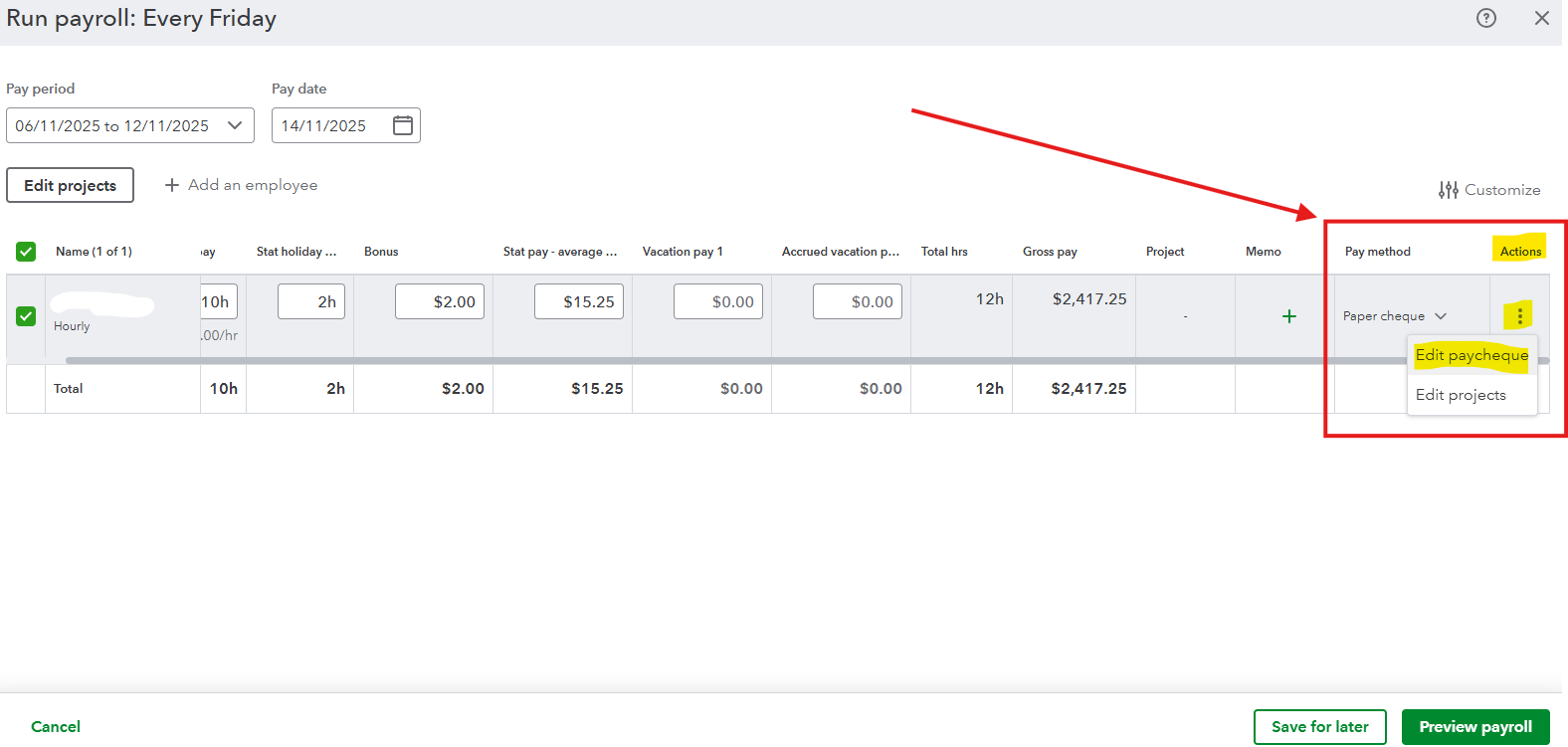
- Click Preview payroll.
- Review the QuickBooks Chart of Accounts dropdown to track your payroll.
- Select Preview payroll details, Save for later, or Submit payroll. Enter the cheque number if you have selected the Submit Payroll option, then hit Close once done.
For Unscheduled Payroll (Give the final paycheck outside your regular pay schedule). Please follow the steps provided in this article: Run payroll in QuickBooks Online Payroll.
After completing the process, be sure to update the employee status to Terminated so you will no longer be charged for them. Click this article for a complete step-by-step process: Create a Record of Employment (ROE) in QuickBooks Online.
Reach out to us anytime if you have follow-up questions or any other queries about QuickBooks. Your concerns are always welcome here in the Community forum.


