You can modify the employer address by navigating to the Payroll Setting, Kierland. I’d be happy to assist you to ensure that the forms display the correct address.
The General tax column will manage your overall company like address and filing information. To edit the employer address, follow the steps below:
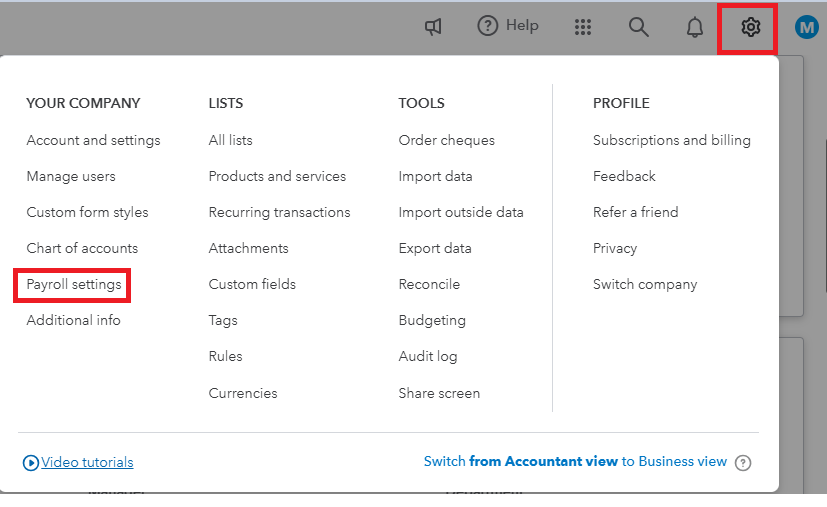
- Go to the Gear icon⚙ and select Payroll settings.
- Click on the Edit ✎ for the General tax section.

- Make the necessary updates and click Save and Done.
Then, update your Company work locations and ensure that they're assigned to all of your employees. For more details on the process above, see this article: Payroll setup: Verify general tax information for your business in QuickBooks Online Payroll.

You can also manually update the work locations by going to the employee's profile. Here's how:
- Go to the Payroll menu and then Employees
- Select an Employee and click Edit in the Employment details column.

- Use the ▼ dropdown to select the Work location or add one.
- Click Save.

Once done, you can generate the T4 forms again. For additional details on preparing and submitting your slips, see this article: Prepare and submit T4 slips and T4 Summary in QuickBooks Online.
Furthermore, I'll provide these links to help you with generating archived forms, printing, and customizing payroll reports in QuickBooks:
If you have questions about updating your address or require extra help with your QBO account, please let me know. I'm here to help. Take care.


