We appreciate you reaching out in the Community forum, aaldersexteriors.
If you're issuing a manual paycheck, you have the option to delete, edit or void it. Depending on your processing time and payroll service, QuickBooks may allow you to remove the transaction.
For direct deposit payments, you can void the paycheque by navigating to the Paycheque list. Ensure to complete this process before 5:00 PM PST. However, if the cutoff time has passed, the payroll will be processed and can no longer be canceled.
Here's how:
- Go to the Payroll menu, and choose the Employees tab.
- Navigate to the Paycheque list and set the date range.
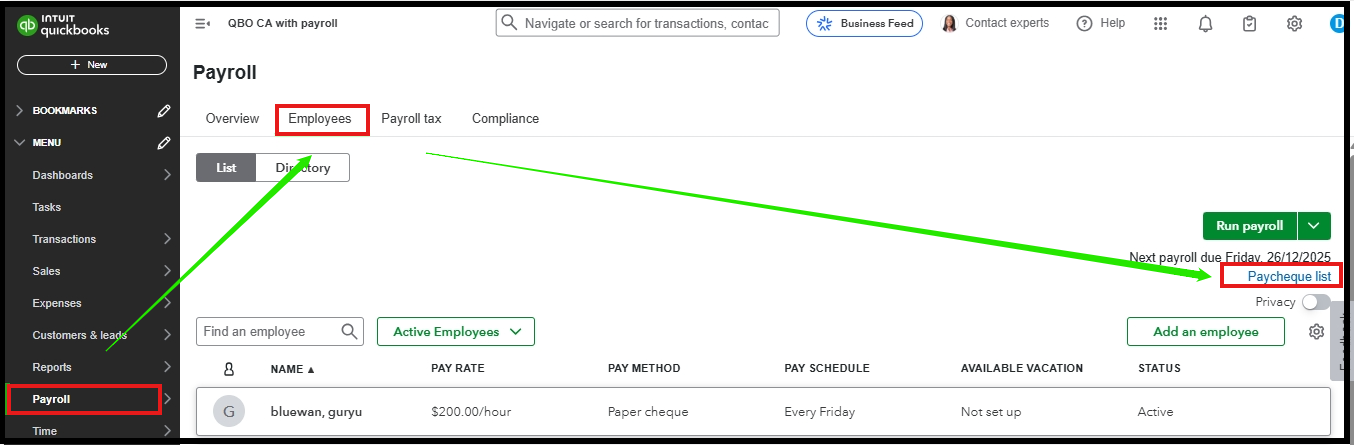
- Besides the Print pay stub, click on the dropdown arrow to select Delete, Void, and Edit.

If the direct deposit has already been processed for ACH, we cannot stop the transaction. Additionally, the processing time depends on the funding schedule set up for your account. You can wait for the funds to be deposited into your employee's bank account.
You can also check out this helpful article for more details on how to edit paychecks in QuickBooks: How to edit paycheques in QuickBooks Online Payroll.
I'll include this article for reference regarding the direct deposit processing timeline for QuickBooks: Direct deposit processing timeline for QuickBooks Payroll.
If you have additional concerns or need clarification, feel free to drop a reply below. We're here to assist you.


