Hi @jwilliams4,
Thank you for bringing this to our attention. I completely understand the importance of maintaining accurate payroll records, especially when employees have direct deposit set up, but the system is recording payments as issued by cheque. Let’s dive into potential solutions and best practices to ensure your system accurately reflects the correct payment method.
First, please ensure that the employees' direct deposit details are set up correctly.
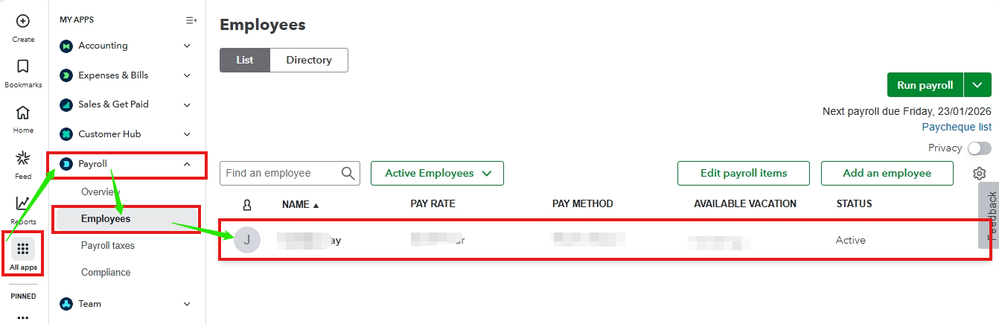
Second, please confirm the Payment method of the affected employees and confirm that it is set to Direct deposit. To do this, please follow the steps below:
- Navigate to All apps, select Payroll, then choose Employees.
- Double-click the affected employee.
- Under Profile, hit Edit in the Payment method section.

- Change to Direct deposit if it was set as a Paper cheque.
- Review all information to ensure accuracy, then click Save.

Also, when processing payroll, be sure to carefully review the Pay method column to confirm it displays Direct deposit before finalizing the process.
However, if everything is set up correctly and the system is still recording payments as a Cheque instead of Direct deposit, I recommend contacting our Live Support team for further assistance.
If you have any additional questions or need further assistance, please don’t hesitate to leave a comment below. We’re here to ensure you get the most out of our service, and we look forward to hearing from you!


