Turn on suggestions
Auto-suggest helps you quickly narrow down your search results by suggesting possible matches as you type.
Showing results for
Hello,
I believe I just messed up our accounts payables and i am not sure what i did.
I made a payment and was trying to print the cheque when i emailed that i printed the wrong cheque. balance should be zero but i now have a balance of $128281.03. i want into Audit log and i am not sure what to do. I deleted a couple payments but i can't find these payments in the suppers bills when i tried to repay theses payments they don't add up with the invoices.
I need help undoing whatever i have done.
Thanks
Solved! Go to Solution.
Keeping financial records accurate can be challenging, Benson. Let's work together to clear your balance and keep your financial tracking accurate.
First, I'd like to understand the specifics. Is the problem related to the cheque details or merely a printing error? In the case of incorrect information, I recommend deleting the cheque and creating a correct version. If it's a printing issue, can you provide more details?
Meanwhile, the discrepancies in your account balance are due to deleted payments, as the program only recognizes outstanding bills. In line with this, you'll want to re-enter the deleted payments to ensure accuracy in your account balance. You can use the audit log as a reference to recover the details of the deleted transaction.
Here's how:
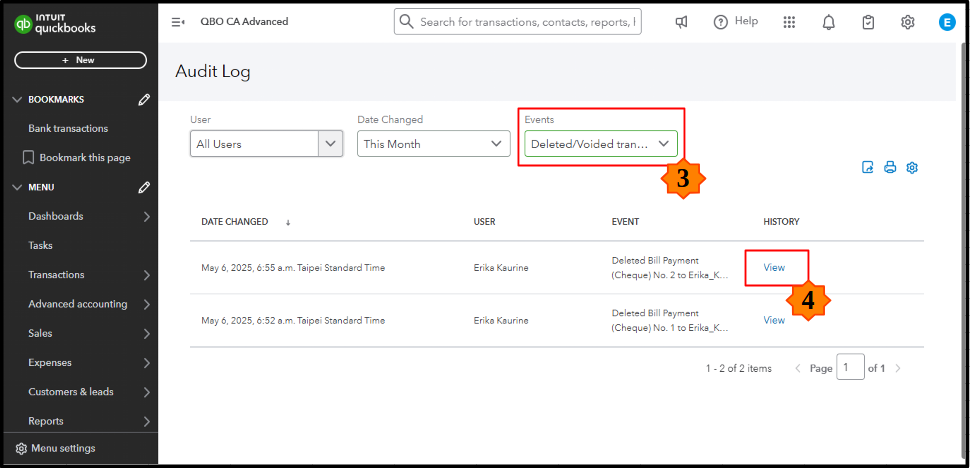

Afterward, you can re-enter the deleted payments with their original transaction details. With all outstanding bills settled, your account's payable balance will now zero out. Moreover, consider consulting an accountant who can expertly guide you through this process to help you maintain precise accounting records and improve your financial confidence.
Finally, I've compiled some helpful guides to assist you in emailing your expense receipts and bills, along with instructions on how to pull up reports with supplier totals:
Have further questions about managing accounts payables? Drop a comment below. Our community is ready to provide the support and guidance you need.
Keeping financial records accurate can be challenging, Benson. Let's work together to clear your balance and keep your financial tracking accurate.
First, I'd like to understand the specifics. Is the problem related to the cheque details or merely a printing error? In the case of incorrect information, I recommend deleting the cheque and creating a correct version. If it's a printing issue, can you provide more details?
Meanwhile, the discrepancies in your account balance are due to deleted payments, as the program only recognizes outstanding bills. In line with this, you'll want to re-enter the deleted payments to ensure accuracy in your account balance. You can use the audit log as a reference to recover the details of the deleted transaction.
Here's how:
Afterward, you can re-enter the deleted payments with their original transaction details. With all outstanding bills settled, your account's payable balance will now zero out. Moreover, consider consulting an accountant who can expertly guide you through this process to help you maintain precise accounting records and improve your financial confidence.
Finally, I've compiled some helpful guides to assist you in emailing your expense receipts and bills, along with instructions on how to pull up reports with supplier totals:
Have further questions about managing accounts payables? Drop a comment below. Our community is ready to provide the support and guidance you need.
Thank you very much. i had to redo the vendor reconciliation and realized that not all of the payments were cancelled just some of them were and that was the reason they did not add up.
thanks again.


You have clicked a link to a site outside of the QuickBooks or ProFile Communities. By clicking "Continue", you will leave the community and be taken to that site instead.
For more information visit our Security Center or to report suspicious websites you can contact us here


