Hello, @2rauto2017.
You can view the customer list from the Customers hub or by running the Customer Contact List report. I'd be glad to give you the exact steps.
Before anything else, please note that data such as the customer list and invoice notes are preserved during QuickBooks Online updates and will remain unless deleted by a user. To identify who modified or removed records, you can review the Audit Log report.
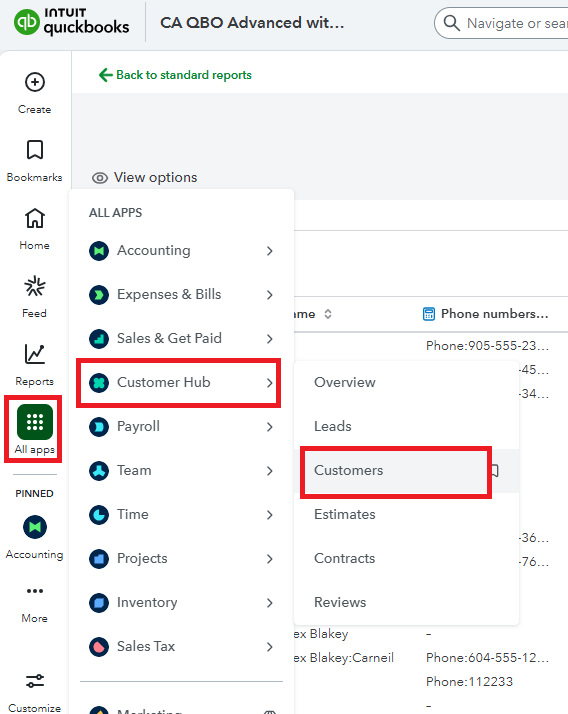
To view the Customers hub:
- Navigate to the All apps.
- Select Customers Hub.
- Click Customers.
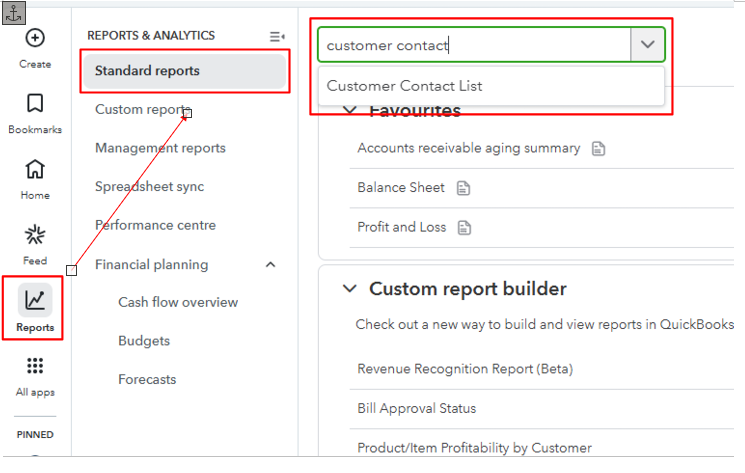
To view the Customer Contact List report:
- Go to Reports.
- Click the Standard report tab.
- In the search box, type Customer Contact List and select the report.
Let us now if you have further questions, we'll be right here to help you anytime.


