I’ve got your back, Roccae. To ensure you can apply the discount provided by your supplier and use it effectively for early payments while accurately recording it in QuickBooks Online (QBO), I will explain the details below. Although this workaround requires an extra step, it ensures precise tracking and proper application of discounts.
Since QuickBooks doesn't have an automatic feature for supplier discounts, we can create a vendor credit to monitor these transactions and allocate them to pending bills or upcoming purchases. This method maintains precise records and correctly reflects the discount in your financial reports.
Here's how:
- Go to Create + and click Supplier credit.
- Select your supplier.
- Choose a category. If you've already created one for discounts, select it. If not, click + Add new to create an account. Note: If unsure which category to use, consult your accountant.
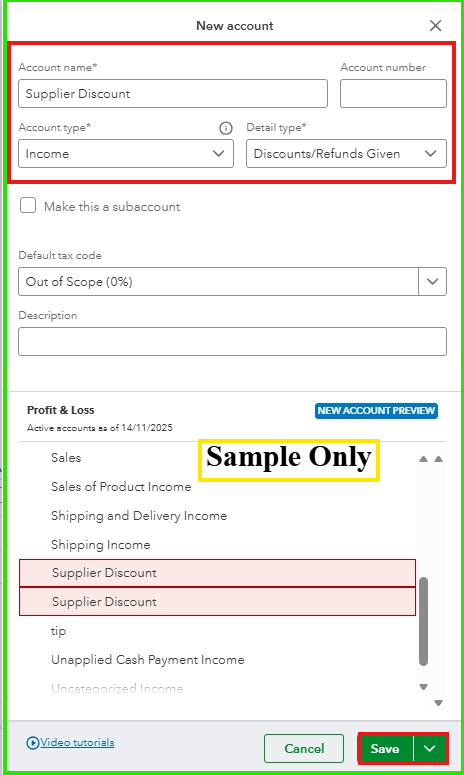
- Input the discount amount.
- Click Save and close.

To utilize the vendor credit, access the supplier's profile. Select Make payment, then click to apply the Supplier Credit, and finalize by clicking Save and close.

I hope this information helps clarify things for you. If you need assistance with any QuickBooks Online (QBO) features, feel free to mention my name in the comments. I’m here to ensure you get the most out of our service and make more informed business decisions.


