Hello there, @kailyn3. You can go to the Payroll tab and select Employees to modify the pay schedule from weekly to bi-weekly in QuickBooks Online Payroll.
The transition from weekly to bi-weekly pay requires updating your specific Pay Schedules within QuickBooks Online. Because this change affects tax calculations and employee expectations, it is best to make this update after completing your final weekly pay run but before starting the first bi-weekly one. Here's how:
- Navigate to All apps and select the Payroll Hub.
- Select Employees and then click Edit in the Employment details section.
- Click the Pencil icon beside the Pay schedule section.
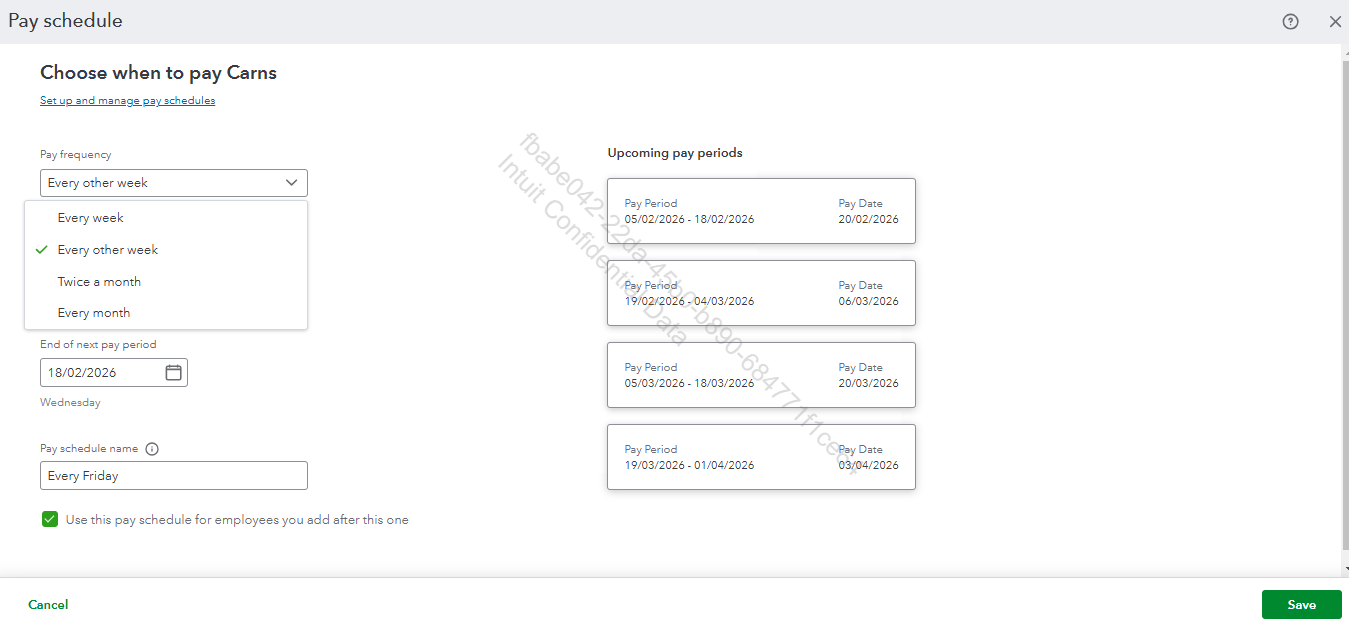
- Change the Pay frequency from Weekly to Bi-weekly or Every other week.
- Update the Next payday and the Next period end date to match your new two-week cycle.
- Once done, click the Save button to apply the changes.
For visual reference, see the image below.
If you have employees on different schedules, you may need to assign them to this new bi-weekly schedule individually within their Employee Profile. For more details, please see this page: Edit or change employee info in payroll.
Please don't hesitate to click the Reply button if you have other questions about QuickBooks.


