Hello there, achu720.
Yes, you are correct that the automated Revenue recognition feature is currently exclusive to QuickBooks Online Advanced.
If you're using a different plan, such as QuickBooks Online Simple Start, Essentials, or Plus, you will not have access to this feature, which is why you are unable to activate it.
However, if managing revenue recognition is essential for your business, upgrading to QuickBooks Online Advanced can simplify complex accounting tasks. It ensures compliance with accounting standards and offers powerful tools to boost efficiency as your business expands.
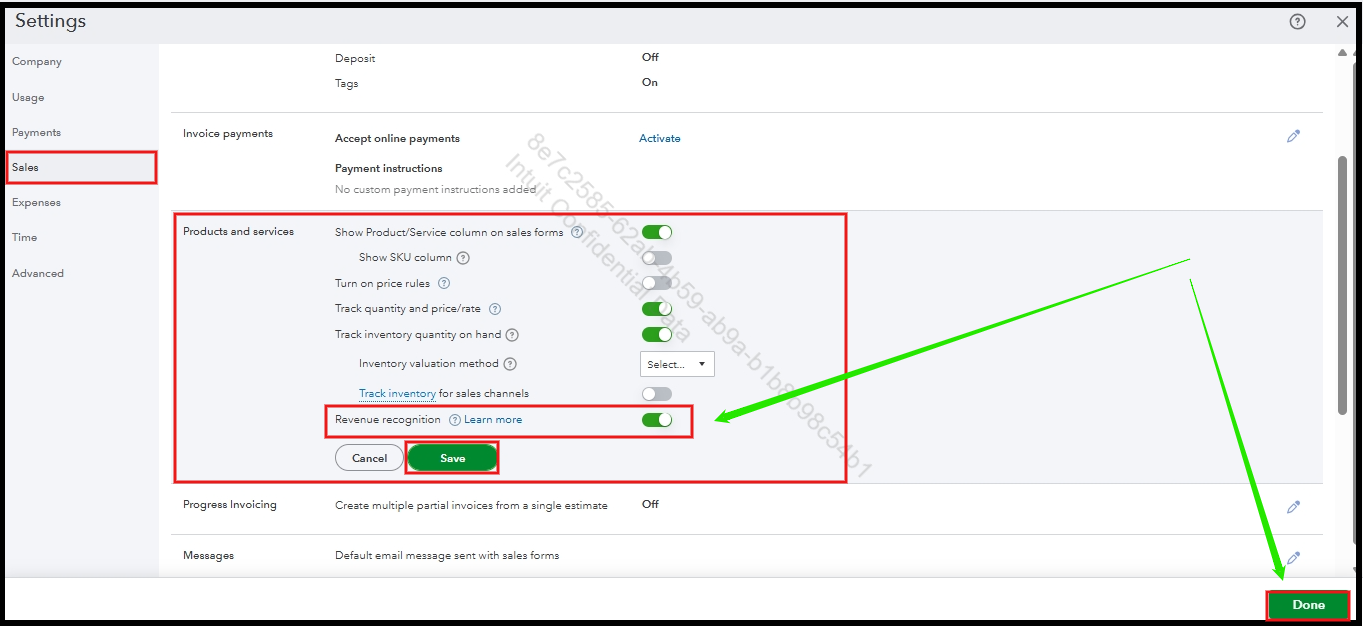
Once successfully upgraded, turning on the Revenue recognition feature is quick and easy. You can follow these steps below:
- Click the Settings gear icon and choose Account and Settings.
- Go to the Sales section.
- Under Products and Services, click on the pencil icon to modify.
- Turn on Revenue Recognition.
- Click Save, then Done.
You can also check out this article to learn how to set up an automatic schedule for a product or service to help with revenue recognition in QuickBooks Online Advanced: Set up a product or service's revenue recognition schedule.
If you have any further questions or require additional assistance, please add a comment below. We are here to help.


