We're glad you've already submitted the requirements to comply with the Financial Transactions and Reports Analysis Centre of Canada (FINTRAC), Deanie149. I'll ensure you get the support you need regarding your concern with the email confirming your compliance.
Since the email confirmation you received doesn't specify which company it's referring to, I recommend contacting our customer support team for assistance. They have the necessary tools and expertise to identify which company under your email address is fully compliant with FINTRAC.
To reach our team, you can utilize the link provided in the email. Here's a visual reference to keep you guided:
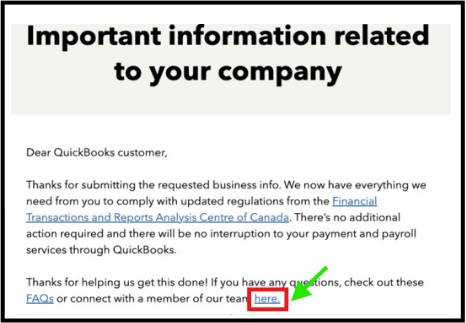
Alternatively, you can access this link and sign in to your Intuit Account to talk with a live expert: https://quickbooks.intuit.com/learn-support/en-ca/contact.
Additionally, consider scanning this article to gather insights about QuickBooks Online and FINTRAC: What you need to know about FINTRAC.
When you're ready to pay your team through direct deposit or receive online customer payments, you can refer to these materials for detailed instructions:
Update us in this thread if you have additional concerns about FINTRAC or other QuickBooks Online-related queries. You can drop your questions by clicking the Reply button below.


