Hello there, Vaibhavsuri01.
Please know that we're unable to change or switch the region or address to another country within the same company file. It's because QuickBooks Online versions are region-specific with differences in tax calculations, compliance, and features.
Since you currently have a QuickBooks Online (QBO) account set up for Canada, we need to cancel the existing account.
Here's:
- Open a web browser on your computer.
- Sign in to QuickBooks Online as the primary or company admin.
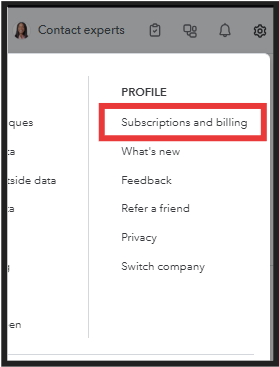
- Go to the Gear icon and select Subscriptions and billing.
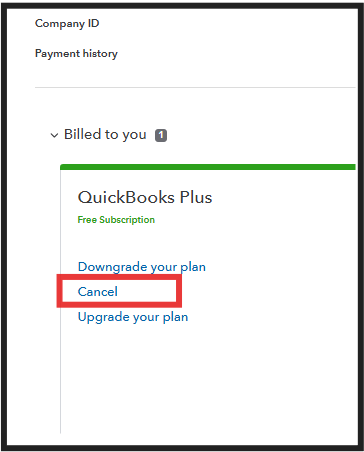
- In the Billed To You section, choose the Cancel subscription.
- Follow the on-screen steps.
Next, create a new UK QuickBooks Online account. Upon signing up, make sure to choose your country in this link: https://quickbooks.intuit.com/choose-country/#europe.
You'll want to manually export data lists and transactions as CSV files and import them into the new QBO UK company file. Refer to this page: Export your QuickBooks Online data.
Please let me know if you have any other questions as you make this transition. I'm here to support you throughout the process, Vaibhavsuri01.


