Turn on suggestions
Auto-suggest helps you quickly narrow down your search results by suggesting possible matches as you type.
Showing results for
Trying to import a budget for 2026 and the template does not support subdivision by class with subclasses. When you look in cell A1 of any of the worksheets the template produces that is a subclass, it only has the name of the <subclass> instead of <Parent>:<Subclass/Child> like it was in our 2025 template.
So when we try to import, any budget data that is only part of a single/Parent-only class gets imported.
If it is a child/subclass, it does not and errors out as it doesn't recognize the subclass name only because it is of course tied to the parent. We have some subclasses that are the same name as others because they are all qualified by the Parent.
Even if we try to input budget data manually, the pull-downs seemed all messed up too - not understanding the class structure at all.
It is like subclasses are not recognized or understood anymore in the Budgetting module.
Hello, jwbroadhead.
When importing a budget with sub-classes, here are the conditions you need to meet to import the file into QuickBooks Online successfully:
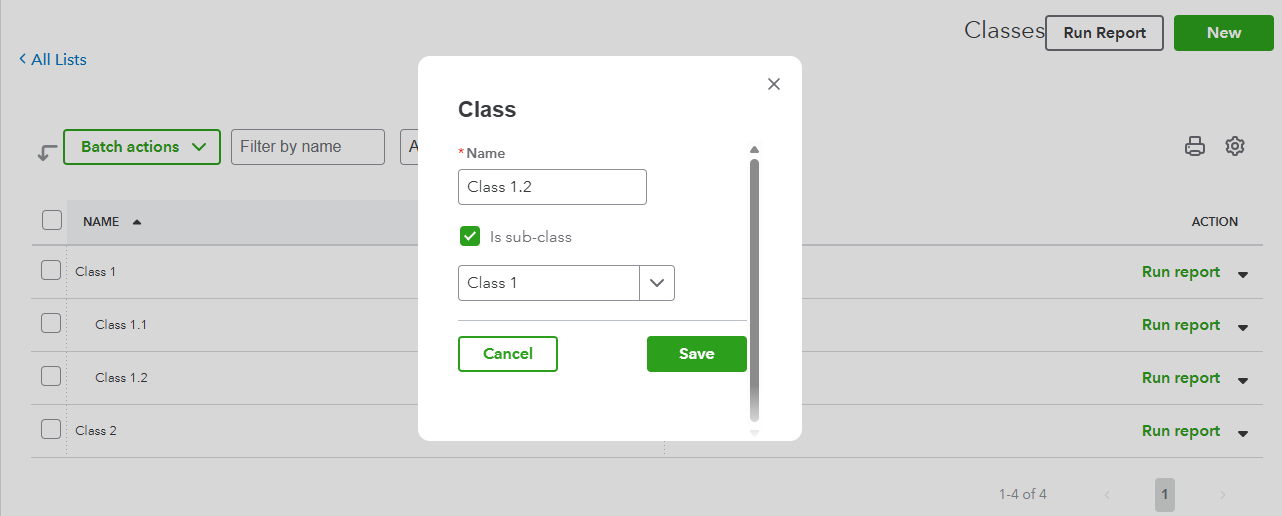
Here are the steps to create the sub-classes in QuickBooks Online:
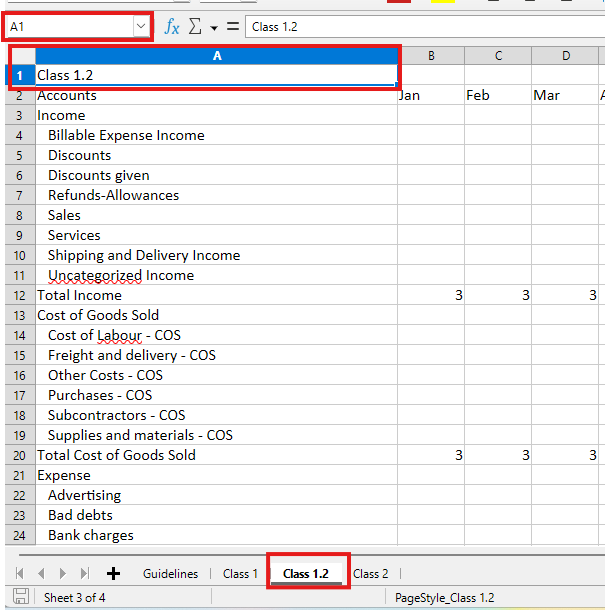
When formatting your file, ensure the sheet name matches the sub-class name you’ve created in QuickBooks Online. You can refer to this screenshot:
When importing the budget file, ensure you’ve selected the correct classes and sub-classes that match those in your file. Here's a screenshot for reference: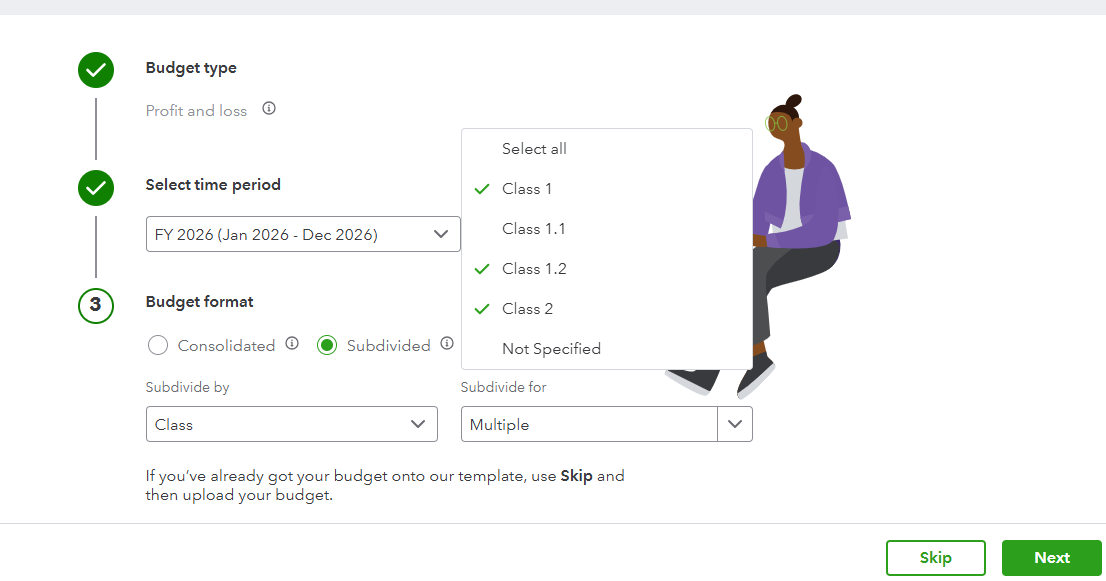
Following these steps should allow you to successfully import the file.
Let us know if you need further guidance or assistance with the process.
We have been using the same classes and subclasses for a decade now so those are setup.
The issue is that something has changed in the last year when it comes to importing the budget that doesn't reflect subclasses correctly. Here is an example using three Parents and their subclasses:
City Impact
- Calgary
- Oakville
- Surrey
MarComms
- Calgary
- Oakville
- Surrey
Corporate - same subclasses
etc
See attached, the 2025 template showing the subclasses as worksheets connected to the parent and, more importantly, in Cell A1 of each respective worksheet, it is in the format <Parent>:<subclass>.
Example of "City Impact: Calgary" shown. Note the parent then a colon then the subclass.
See then in the 2026 template file, each worksheet is named by the subclass only so when you have subclasses with the same name, Excel just replicates those names and puts a (1) or (2) as it considers it a duplicate. (I don't think worksheet name matters though). The key is cell A1 in the respective worksheet and in the 2026 template, ti only puts the name of the subclass so it has no relationship with the parent. Example shown of the same City Impact Parent - just shows "Calgary". The MarComms worksheet for the subclass Calgary just shows "Calgary" as well - so there is no relationship to the Parent.
As a result the import fails because there is no Parent Class of Calgary. It is always a subclass of a parent.
So I manually entered "City Impact:Calgary" into the 2026 template for that worksheet to reflect what worked in 2025 and it fails as well. All times just saying it can't load the sheet due to an invalid name...for every worksheet that is a subclass... and we have 71 of them.
Again to confirm - the import process worked flawlessly in January 2025.
It's like subclasses are not seen now - or not handled correctly. Appears like a bug.
Classes are working fine in the accounting part - it's the Budget module import that appears to be broken.
Even now when viewing past budgets, the pull-down menus don't seem to show the subclasses correctly. In the above examples you just see a bunch of "calgary" but don't know what respective parent each correspond to.
And no, we can't name all of our subclasses differently. We have used them successfully for years the way they are. And, that's one of the points of subclasses, to be able to group around another dimension.
I have talked to support and they agreed something looked funny but I don't know how to get an update. Hoping someone else here has imported a budget this year that might know a hack.
We can't be the only ones who have tried to import a 2026 budget with subclasses.
It's holding us up in getting our Budget inputted for the year.
Hello, @jwbroadhead.
I understand how you feel right now, and it is clear how much effort you have already put into this, especially with lots of subclasses for your 2026 planning.
I recommend reaching out to our Live Support team again to have this further reviewed and guided to the resolution, and get an update on your previous case. They have the tools that can safely check both you and their end to identify the root cause of the error you are experiencing.
Here's how to get in touch with them again:
Feel free to check this article if you want to learn about our support availability hours: Get help with QuickBooks products and services.
We appreciate your patience in getting this sorted out. Please let us know if there's anything else we can do for you.


You have clicked a link to a site outside of the QuickBooks or ProFile Communities. By clicking "Continue", you will leave the community and be taken to that site instead.
For more information visit our Security Center or to report suspicious websites you can contact us here


