Hello there, @cdrowntree-outlo. When you process a transaction in the Recurring Transactions Reminders List using Edit and Create, the reminders won't disappear. It doesn't clear the reminder from the list after the transaction is created.
Instead, use the Action dropdown and select Create. This will make the reminder disappear from the list after processing.
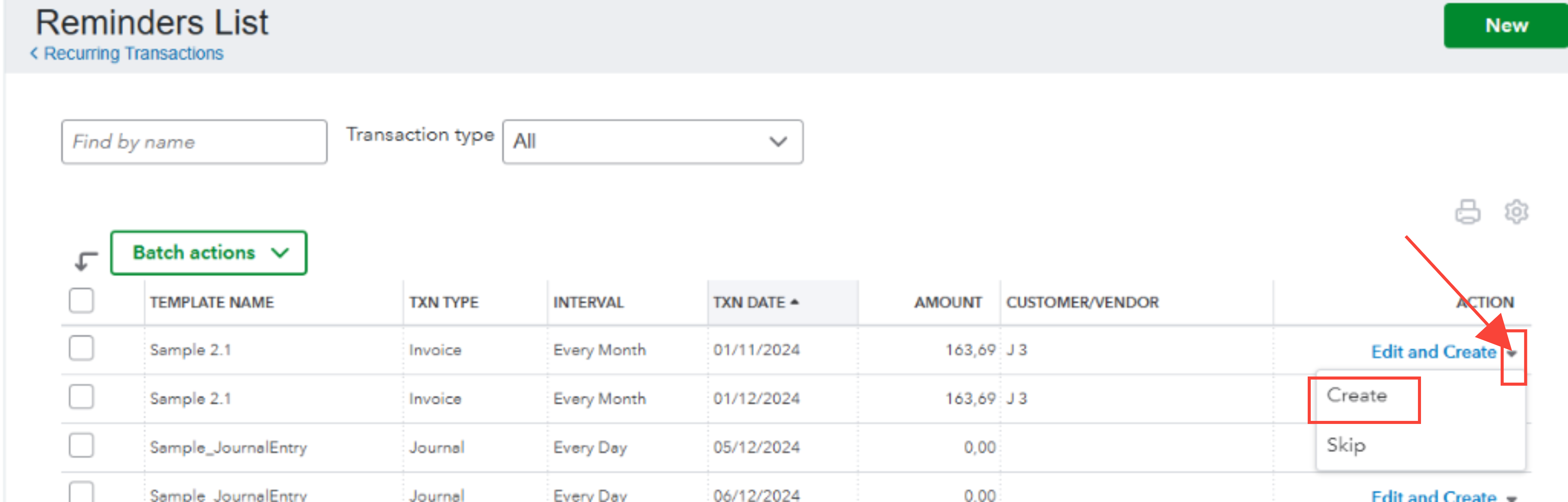
If you need to make changes to the transaction before creating it, edit the recurring template first from the main Recurring Transactions page, then use the Create option from the Reminders List.
However, if the reminder still remains after using the Create workflow, consider logging in with an incognito or private browsing window, or try switching to another supported browser. This helps eliminate browser cache issues and often forces the reminder to clear as expected.
Additionally, you can refer to this article for guidance on editing your recurring template: Edit a recurring template.
If you have any further questions about your recurring transactions or any other QuickBooks concerns, we're here to help.


