Turn on suggestions
Auto-suggest helps you quickly narrow down your search results by suggesting possible matches as you type.
Showing results for
Every time I log into quickbooks I am prompted with the product tour. I close it off, I next through the options, it always comes back up. It's very annoying to have to deal with this every time. I experience it on my macbook and my windows pc. Is there anyway I can turn this off please?
Hi there, @JALTT.
I understand that recurring product tour pop-ups can be distracting. Let's take a few steps together to troubleshoot and improve your experience with QuickBooks Online (QBO).
The product tour typically appears for new users as a guide to help them understand the platform. Currently, we don't have an option to turn off this navigation pop-up.
However, since it continues to display every time you log in, I recommend opening an incognito window to access the product with a clean slate.
Alternatively, you can switch to other supported browsers for better compatibility.
Don't hesitate to Reply below if you have further questions. I'm here to help.
I get the same product tour pop up when I visit the site in incognito mode. I have a tried a different browser and the issue is the same. I use edge and safari.
I was recently (maybe about 5 weeks) added to this quickbooks account and I have been dealing with this issue since.
Hi JALTT,
Thank you for getting back to us and letting us know about the recurring product tour pop-up in QuickBooks Online (QBO). I understand how frustrating this can be, and I appreciate your patience as you’ve already tried the troubleshooting steps shared by my colleague.
As mentioned earlier, the product tour pop-up is meant to help new users get familiar with the platform. At this time, QuickBooks Online doesn’t offer a way to permanently turn off these tours or promotional pop-ups. Since you were recently added to the account, your user profile may be recognized as new, which is why you're seeing these feature announcements.
In the screenshot you shared, it shows "1 of 4." Rather than clicking the "X," select Next four times until the button changes to Done or Finish, even if you’re not using the tour. This action marks the tour as completed for your user profile. If you skip the final button, the tour will restart every time you refresh the page.
If this issue continues to disrupt your workflow, I suggest submitting feedback directly to QuickBooks. You can do this by going to Gear icon > under PROFILE click Feedback in your QBO account. Customer feedback plays a big role in helping QuickBooks improve and prioritize updates like this.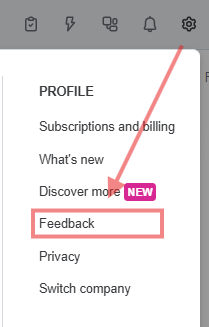
If there's anything else I can assist you with, feel free to return to this thread whenever you have additional concerns about display preference and other feature setups in QBO. I'll get back to you as soon as I can.
In the screenshot you shared, it shows "1 of 4." Rather than clicking the "X," select Next four times until the button changes to Done or Finish, even if you’re not using the tour. This action marks the tour as completed for your user profile. If you skip the final button, the tour will restart every time you refresh the page.
I've done this several times.


You have clicked a link to a site outside of the QuickBooks or ProFile Communities. By clicking "Continue", you will leave the community and be taken to that site instead.
For more information visit our Security Center or to report suspicious websites you can contact us here


