The option to create a header for the Project Name and include a drop-down list of your customer jobs is unavailable in QuickBooks Desktop (QBDT), @JKMatsko. This feature is exclusive to the Customer column section. Let me explain this further below.
If you prefer not to use this feature, you can use the Other custom field in the header of the Purchase Order (PO) template to track the customer's project instead. However, please keep in mind that the Other custom field will only record the customer's project in the actual PO and will not link to the customer's project account.
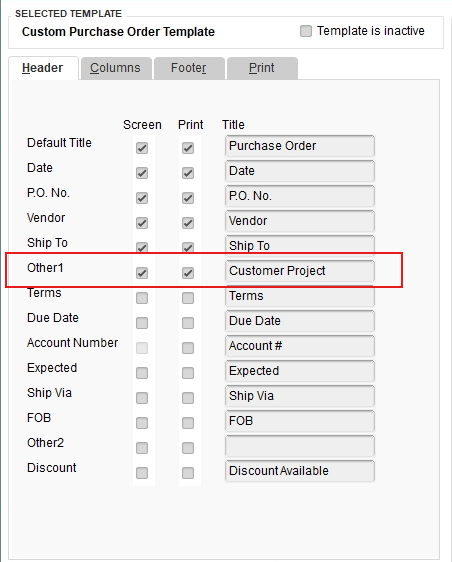

Since having a drop-down list of customer jobs in headers would be highly beneficial, we recommend submitting Feedback to Intuit. They consider user suggestions when planning updates. Here's how to do it:
- At the top menu bar, click Help.
- Choose Send Feedback Online.
- Enter your product suggestion.
- Select Send Feedback to confirm.
To learn more about customizing templates in QuickBooks Desktop, visit this guide: Use and customize form templates.
Furthermore, check this article for detailed instructions on creating and using custom fields in QuickBooks Desktop for Windows or Mac: Create and use custom fields in QuickBooks Desktop.
If there's anything else I can assist you with or if you need further details about your customization, please don't hesitate to ask. I'd be glad to help.


