Hi @AccountantUser1,
Thank you for taking the initiative to update your payroll tax table to the 2026 version in QuickBooks Desktop (QBDT). Ensuring tax compliance is essential, and I’m here to support you throughout the process. Let’s work together to make the update seamless and successful.
To ensure you get the full functionality of payroll updates, let’s begin by verifying and updating your QuickBooks Desktop to the latest release. Here's a step-by-step guide to walk you through the process:
Step 1: Check if you have the latest release.
Here's how:
- Open QuickBooks Desktop.
- Press F2 (or Ctrl+1) to open the Product Information window.
- Note your current version and release.
You may refer to this article to check if a newer release is available to you: Release notes.
Step 2: Download and install the latest updates.
Please follow the steps below for installing it:
- Download the latest updates.
- Close your company files and QuickBooks.
- Open the Windows Start menu.
- Search for QuickBooks Desktop, right-click the icon, and select Run as administrator.
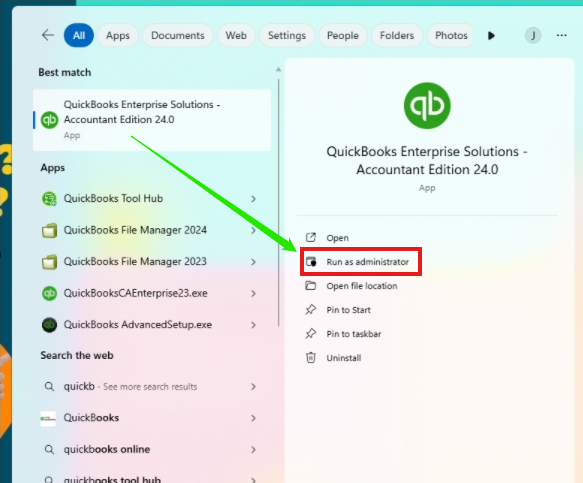
- On the No Company Open screen, go to the Help menu and click Update QuickBooks Desktop.
- Navigate to the Options tab. Select Mark All and then hit Save.
- Go to the Update Now tab and select the Reset Update checkbox.
- When you're ready, select Get Updates.
When the update is finished, close and reopen QuickBooks Desktop. To install the updates, select Install Now. When the installation finishes, please restart your computer.
Once QuickBooks Desktop is fully updated, you can proceed to download the latest payroll tax table to ensure it's updated for the upcoming 2026 tax table.
If the payroll tax table doesn’t update to the 2026 version after completing the steps above, please visit this article and follow the provided steps to help you fix this: Fix common problems and errors with the QuickBooks Desktop Tool Hub.
I hope this guide helps you update your tax table to the 2026 version. Please feel free to click the Reply button below if you need additional assistance. I’m here to help. Wishing you a great day!


