Hi, prairiepruningservices.
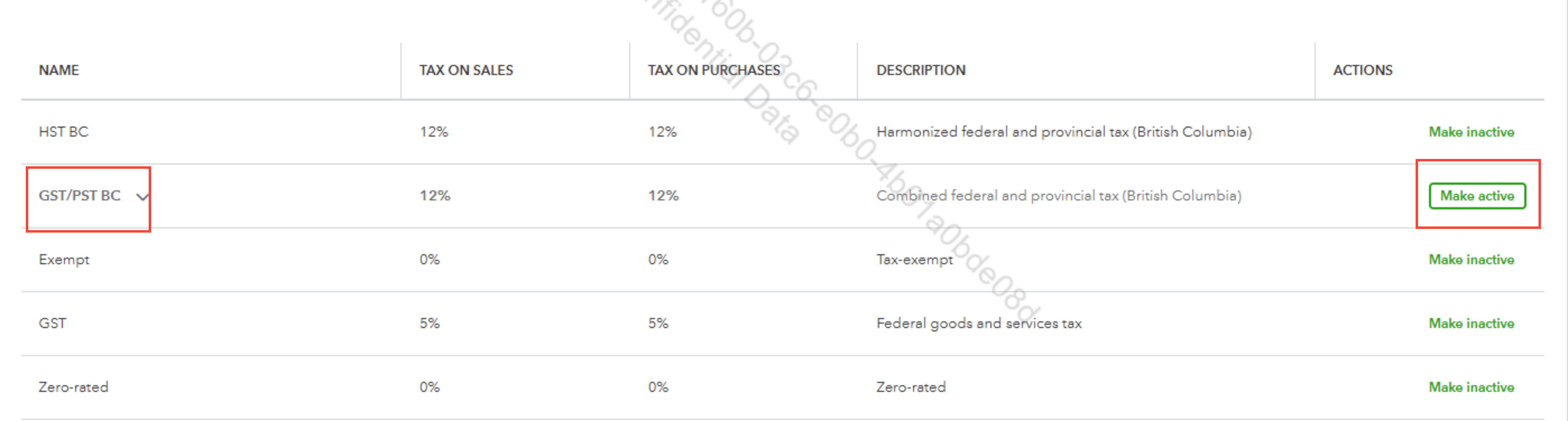
Let's check your Manage sales tax to see the status of your taxes. If these taxes are inactive or not properly set up, that’s likely the reason why they are not showing up on the invoices dashboard.
QuickBooks Online (QBO) requires the sales tax feature to be enabled for tax options, including GST and PST, and custom rates, to show in the dropdown on invoices, estimates, or sales receipts.
To activate it, here's how:
- Go to Sales Tax.
- Click Manage Sales Tax in the upper right corner.
- Find GST/PST tax and, in the Action column, select Make Active.
- Click Done to save your changes.
After making the tax active, try creating an invoice to check the GST and PST tax rate.
If you have other questions about Taxes, leave a reply below.


