Turn on suggestions
Auto-suggest helps you quickly narrow down your search results by suggesting possible matches as you type.
Showing results for
I have been having trouble updating the july 1 2024 payroll update. Have been doing it manually since then.
Also everytime that i opened quick books pro 2024 desktop it tells me that there is an update, i go to do it, but it stops half way through, so I have had to abort. Eventually i could not get into quick books at all. I have tried all the suggestions posted, but nothing seemed to work.
Today i right clicked on the quick books icon and clicked on trouble shoot compatability then program compatibility trouble shooter. Did this several times.
Well, now I can get into quick books. First thing i did was a back up. Quick books is working, but is very very slow.; I checked my payroll and it now shows that it is good until 12/31/25 Attaching screen snips.
I am almost afraid to close quick books now as i still need to do the update when i open it. Question is because i was doing payroll manually how do i make sure all year end stuff is correct? Someone had posted this before, but unfortunetly I can not find it. Any help is appreciated
Hi, Mary. I appreciate your efforts in troubleshooting the system. It’s a great step that you were able to back up your data right away.
It's important to remember that QuickBooks relies on the accuracy of the data you enter. Please make sure that all payroll transactions, including wages, taxes, and deductions, are accurately recorded. You can run payroll reports to review the totals and verify that employee year-to-date amounts are correct. Also, consider using the QuickBooks Year-end guide to review all necessary steps before closing the year.
Lastly, continue to back up your data regularly before exiting QuickBooks. This ensures your progress is saved and minimizes the risk of data loss during future updates.
Feel free to add a reply if you have other questions. We're here to assist you further.
how do i do the payroll reports?
It's great to have you back here in the Community forum, mary53.
You can access the Reports menu at the top and select Employees and Payroll. Then, run the Payroll Transaction Detail report or other related ones to view your payroll totals or transactions. I'll add a screenshot for visual reference. 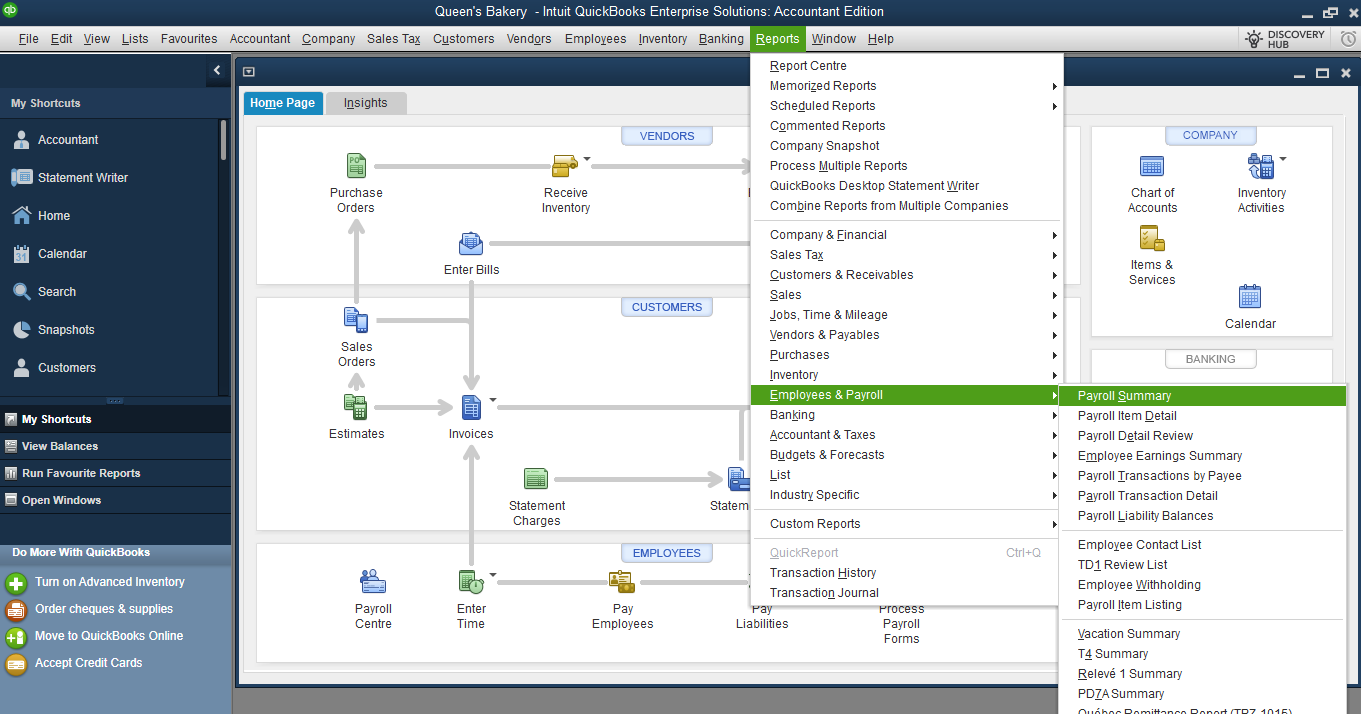
Here's an article for more info about payroll reports: Customize payroll and employee reports.
For follow-up questions, drop a comment below.


You have clicked a link to a site outside of the QuickBooks or ProFile Communities. By clicking "Continue", you will leave the community and be taken to that site instead.
For more information visit our Security Center or to report suspicious websites you can contact us here


