Turn on suggestions
Auto-suggest helps you quickly narrow down your search results by suggesting possible matches as you type.
Showing results for

Hi, Melissa. The closest report that shows all expenses assigned to a customer or project is the Transaction List with Splits. I'll walk you through the steps.
Please note that QuickBooks Online doesn’t have a specific filter to display only expenses billed to a customer. However, you can export the report and manually remove transactions that don’t apply. Here’s how:
Here's a sample of the report: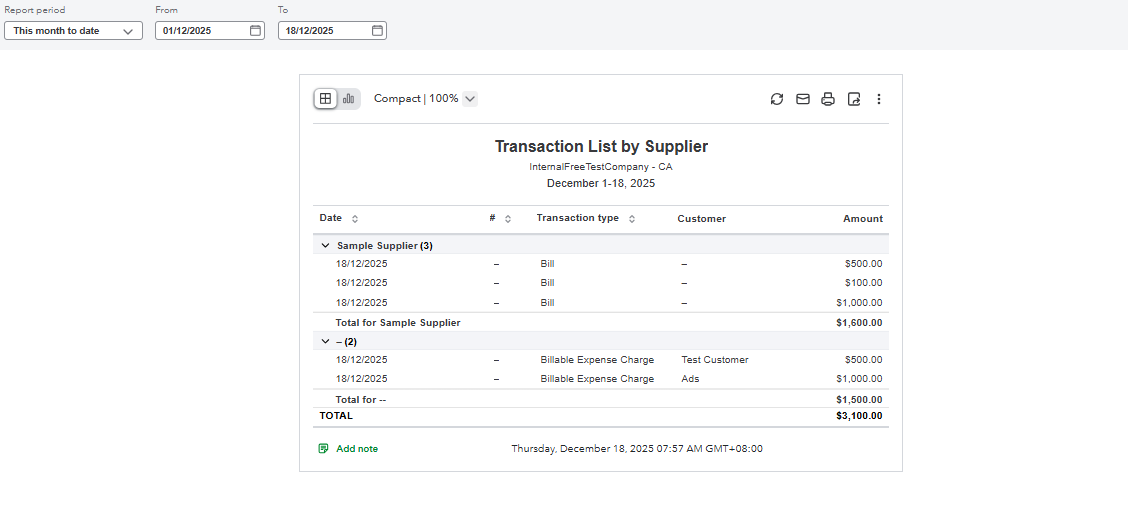
Please don't hesitate to reply if you need more assistance. We're just around.
Regarding the Transaction List with Splits, how does it handle multiple projects per customer, as mentioned under Sales and customers in the Topics section?
Hi there, Brice.
The Transaction List with Splits report in QuickBooks Online (QBO) manages and displays transactions associated with multiple projects under a single customer by breaking them down into separate, detailed line items.
Each project is treated as a sub-category of the customer, and any transaction split across multiple projects is displayed as separate rows in the report.
You can also customize the report to better identify the different projects associated with the same customer.
Please let us know if you have additional questions or concerns.


You have clicked a link to a site outside of the QuickBooks or ProFile Communities. By clicking "Continue", you will leave the community and be taken to that site instead.
For more information visit our Security Center or to report suspicious websites you can contact us here


