Limited time only. 50% off QuickBooks for 6 months.
cancel
Showing results for 
Search instead for 
Did you mean: 
Announcements
LeeMcQ
Level 1

On screen background colour

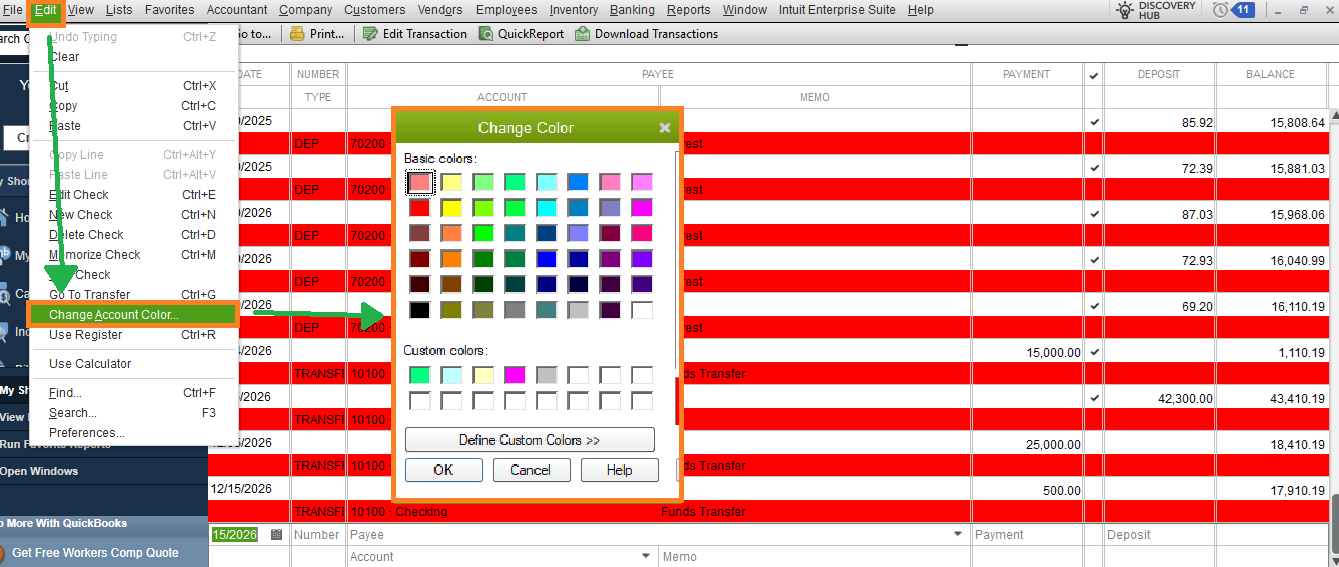
For some reason when I display my cash account on screen it displays 1st line Red, 2nd line White rather then the 1st line a little grey, 2nd line white.  The red  is obnoxious and I want to revert to the old colour scheme. Can someone tell me how to do this and also shed some light on why it changed?

Thanks

Lee McQ

1 Comment 1
Irene R
QuickBooks Team

On screen background colour

Hi there, LeeMcQ. It seems that the background colour of your registrar has been changed to red.


Let me help you revert this to the old scheme by adjusting the account colour. Here’s how:  


  1. Open your cash account, then go to the Edit menu.
  2. Choose the Change Account Colour.
  3. Select the little grey as your desired colour.
  4. Click OK.


On top of that, you can also modify the colour scheme of your Company File through the Desktop View section in the Preferences.


Please let us know if you have any further questions.

Need to get in touch?

Contact us