Running the Accounts Receivable Aging Detail Report by customer is unavailable in QuickBooks Online (QBO), Mark.
By default, the A/R Aging Detail Report is generated by due date. However, you have the option to filter this report by a specific customer, which essentially mirrors the data presented in the A/R Aging Summary Report.
Here's how:
- Go to Reports, then click Standard reports.
- Search for the Accounts Receivable Aging Detail report.
- Hit the Columns icon.
- Remove the unnecessary filters and arrange the filters in the order shown in the picture to achieve this view of the A/R Aging Detail report.
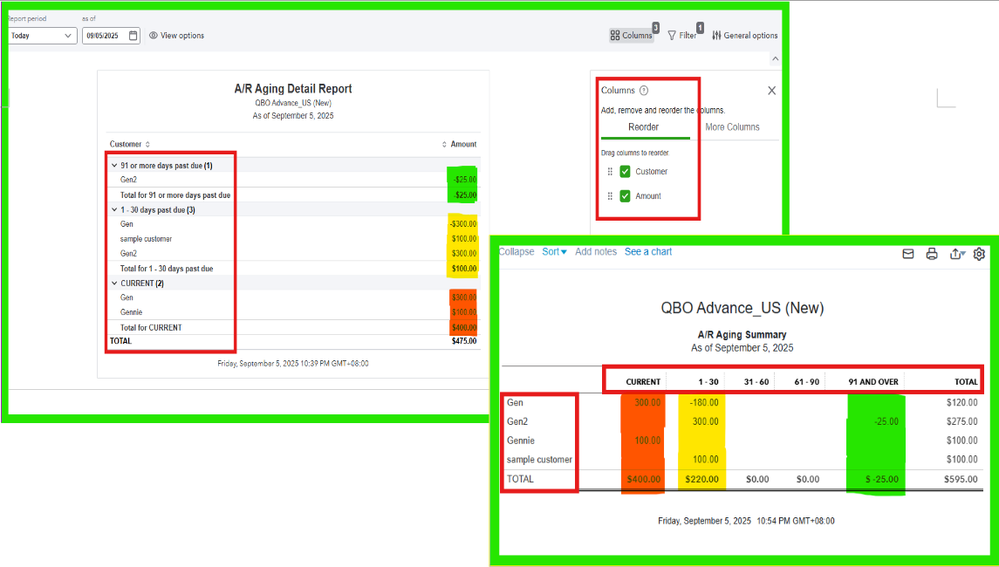
In the A/R Aging Summary Report, the due dates are displayed at the top, while the customers' names are listed on the left side. In contrast, the A/R Aging Detail Report places both the due dates and the customers' names on the left side of the report. This indicates that the A/R Aging Detail Report and the A/R Aging Summary Report are effectively the same when filtered as shown in the picture above.
You can also check out this article for detailed information about customizing and memorizing reports in QuickBooks Online: Customize reports.
You can always come back here in the Community if you have other questions or concerns.


