Welcome to the Community! @desautels.julie,
In QuickBooks Online, a transfer between accounts creates a double-sided entry, meaning money moves from one account to another. Deleting one side of the transfer will also remove the other to maintain balance.
To fix this, we need to "un-post" it so it stops being a transfer and becomes a simple expense.
Here's how:
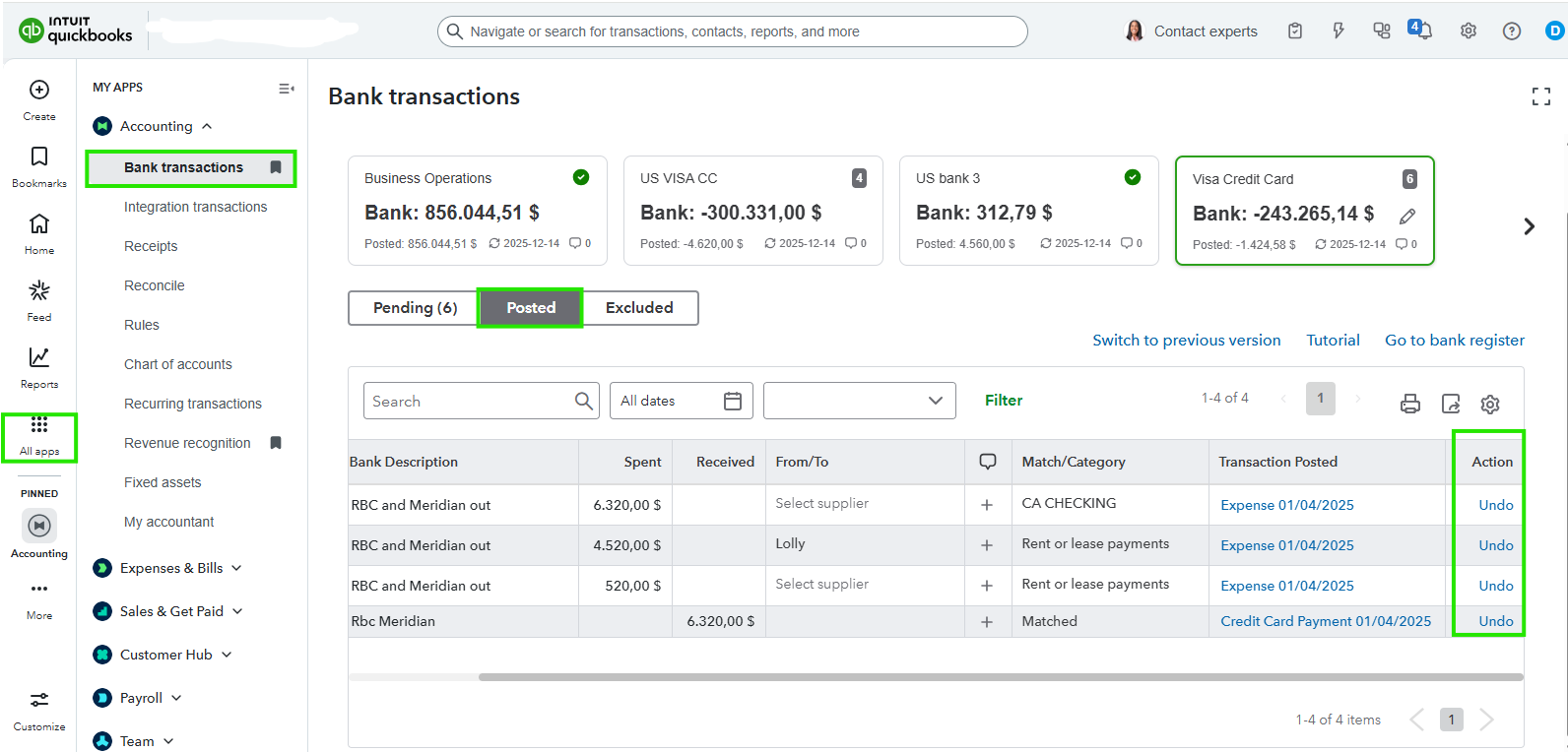
- First, click on All Apps in the left-hand menu and select Accounting.
- Next, click on Bank transactions to open your bank feed workspace.
- Then, click on the Posted tab located at the top of the transaction list.
- Locate the transaction in the list and look at the Action column on the far right. You will see the Undo button there.
- Click Undo. It removes the transaction from your books and sends the raw data back to the For Review tab.
- Now, click on the For Review/Pending tab and look for the same transaction.
- Click on the transaction to expand it and ensure the Categorize button is selected; do not select Record as Transfer.
- Finally, pick your specific expense account in the Category dropdown and click Add.
It will break the link to the deposit side and allow it to show up correctly on your reconciliation as a single line item.
If you need anything else, let us know in the comment. We're always here to help.


