Hello Jennifer,
Welcome to the community space, and thank you for bringing this to our attention. I understand you're experiencing an issue with a payment status that needs to be reset from 'Returned' to 'Paid.' I recommend reaching out to our QuickBooks Payments Live Support team, as they have the tools and resources to investigate and resolve this issue.
Since the payment has already been successfully deposited and reconciled, the only issue remaining is the incorrect status showing on the invoice. To resolve this, the best course of action is to contact the Live Support team. You can request them to specifically clear or reset the payment status from 'Returned' to 'Paid' or remove the 'Needs Attention' flag while ensuring that all existing deposits and reconciled entries remain unchanged.
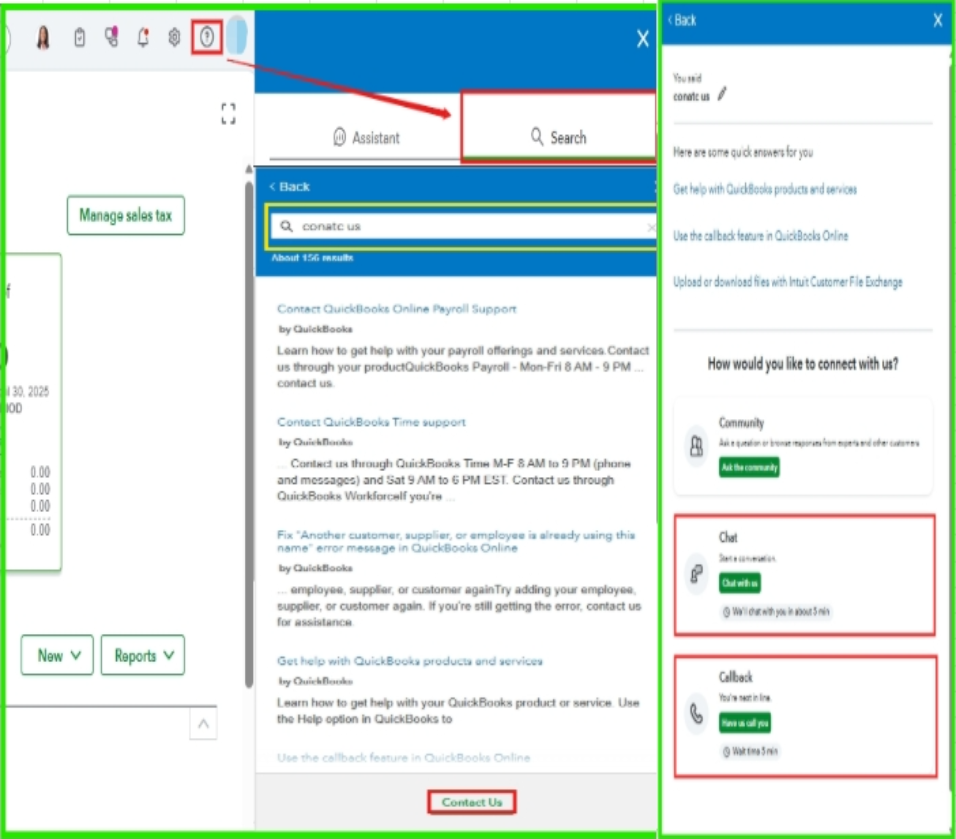
Here's how:
- Log in to your QuickBooks Online (QBO) account.
- Navigate to the Help menu.
- Select the Search option and hit the Contact Us tab at the bottom.
- Enter the question, keyword, or topic you need help with.
- Follow the prompts, then choose a way to connect with us.
For more information about support hours, check out this article: Get Help with QuickBooks Products and Services.
If you have additional questions or need further clarification, feel free to use the Reply button below. Our Community team is here to help. Have a wonderful day!


