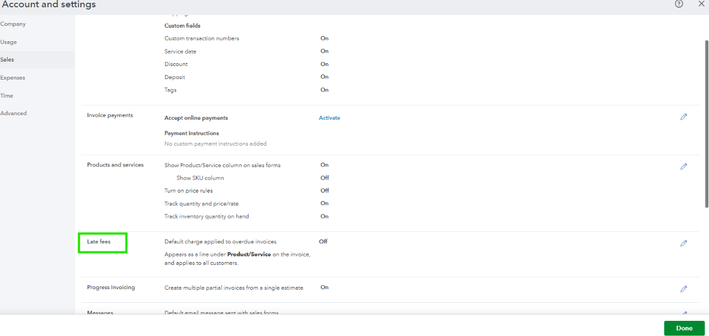
You can turn on the automatic late fee feature in the Accounts and Settings page. ParkView.
QuickBooks Online (QBO) calculates and applies late fees to overdue invoices starting the day after you enable the late fee feature. It doesn't retroactively apply late fees to invoices that were overdue prior to turning on the setting.
To turn this on, follow the steps provided below:
- Navigate to the Gear icon, then go to Account and settings.
- Head to the Sales tab on the left panel.
- Locate the Late fees section and select Edit to make changes.
- Turn on the Default charge applied to overdue invoices switch.
- Enter the Amount and/or Percent (%) of the fee.
- In the Frequency dropdown, choose how often you charge customers.
- (Optional) Set a grace period by the number of days before the fee takes effect.
- (Optional) Edit the default name Late fee.
- Hit Save.

To know what happens when you change the automatic late fee settings, check out this article for more details: Turn On Automatic Late Fees.
If you have any questions or additional queries about late fees, let us know so we can get back to you. The Community team is always here ready to assist you.


