We cannot make any changes directly in the Audit Log, B-gagnon33. To undo the changes you've made, we'll have to manually re-open the invoice.
In QuickBooks Online (QBO), the Audit log is a feature that tracks all changes made within your account, recording user actions, timestamps, and specific modifications to transactions. However, you cannot make changes directly in the Audit Log to maintain the integrity and security of your account's history.
If you want to edit the invoice back to its original name and reapply the payment, please follow these steps:
- Go to the Customers & leads, then choose Customers.
- Click the original invoice owner to open their profile and see their transactions.

- Locate the invoice that you've edited, then click View/Edit.
- In the Customer field, change the person's project name back to the person's name.
- Click Save and Close, then Yes.

- In the customer's profile window, locate the Unapplied Payment, then click View/Edit.
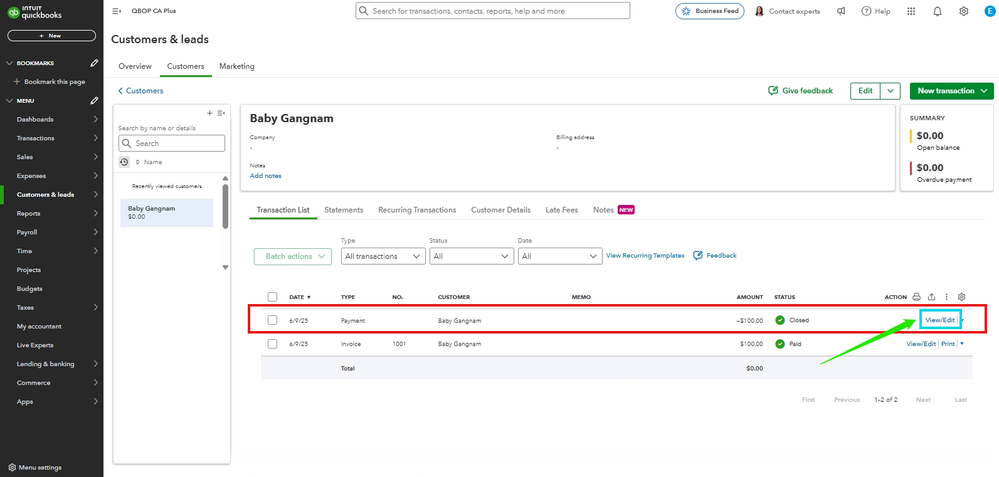
- Put a checkmark on the invoice to relink the payment and invoice.
- Click Save and Close, then Yes.
Moving forward, to track your transactions by project, create invoices directly under the customer's name within a project.
You can also customise invoices, estimates, and sales receipts in QuickBooks Online which can help you enhance your business communications.
Please let us know in the comments below if you need further assistance, and we will respond as soon as possible.


