Hello and welcome to the Community, Revti.
QuickBooks Desktop provides the option to manually select and make multiple customers or vendors inactive.
Here’s how to inactive customers:
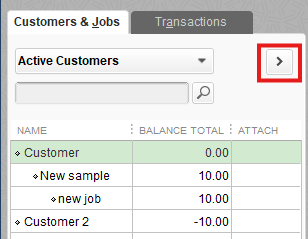
- Tap the Customers menu and pick Customer Center.
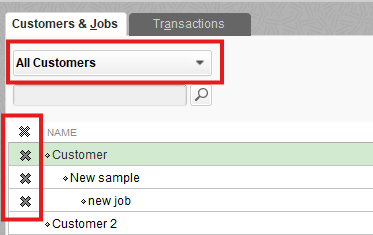
- Ensure All Customers are chosen from the dropdown.
- Under the X column, tick all the customers you need to make inactive. If they have a balance, a pop-up window will appear. Tap Yes to continue.
To inactive vendors, please the steps below:
- Go to Vendors and choose Vendor Center.
- Make sure All Vendors are displayed in the dropdown.
- Under the X column, mark all the vendors you wish to deactivate. If they have an open balance, you will be prompted before making them inactive. Then, tap Yes to proceed.
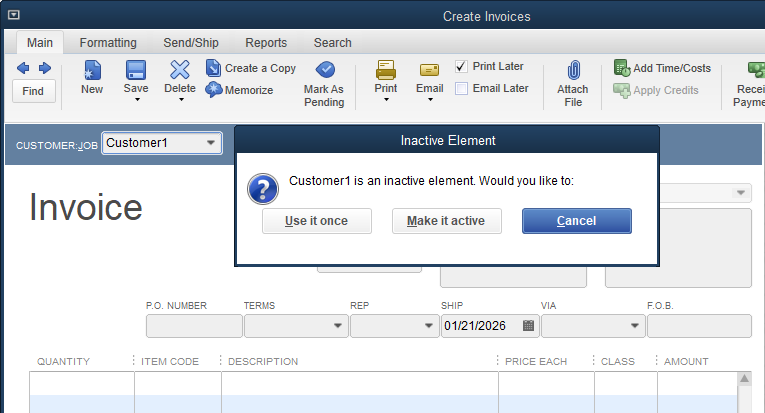
Additionally, when attempting to create a transaction for a customer or vendor that has been made inactive, QuickBooks Desktop will notify you, allowing you to reactivate them when needed. Please ensure that you enter their name exactly as it’s recorded in the system.
Please let me know if you have any further questions or need additional assistance.


