Turn on suggestions
Auto-suggest helps you quickly narrow down your search results by suggesting possible matches as you type.
Showing results for
Hi there, Moody3! It’s great to have you here. Since you’re new to QuickBooks Online (QBO), you can use our integration features to connect to third-party apps. Once your WooCommerce plugin is configured, it will automatically sync information to QuickBooks, and you’ll receive notifications via your dashboard or email for every successful import.
Keep in mind that once imported, orders will appear in QuickBooks as invoices, sales orders, or sales receipts, depending on your integration setup, since the program relies on transaction data from your website. After syncing, the bill-to and ship-to details, along with payment and tax information, will be included in the invoice, sales order, or sales receipt.
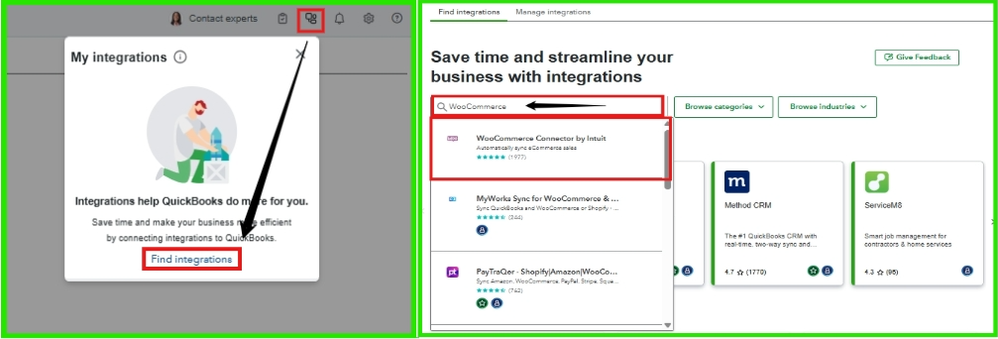
Here's how:


Alternatively, you can visit My Integrations, select Find Integrations, use the search bar to locate the WooCommerce Connector by Intuit, and then click on Get Integration Now.
For proper configuration, consult an IT expert or a WooCommerce specialist to ensure smooth syncing.
If you have any questions, the Community and I are here to assist you. Feel free to reach out anytime!