cancel
Showing results for 
Search instead for 
Did you mean: 
Announcements
klderksen
Level 1

My client has QB Online Plus and there is no option to set up automatic late fees on customer invoices. However, when I go back to the Accountant page, I can set it up?

Everything I've read online says I should be able to set it up for my client, but there is no Late Fee option in the Settings.

2 Comments 2
jamesjdt
Moderator

My client has QB Online Plus and there is no option to set up automatic late fees on customer invoices. However, when I go back to the Accountant page, I can set it up?

Hi klderksen,


I can see how this situation can raise questions, especially with the differences between the Accountant page and the client’s settings. Let me share an alternative method for turning on Late Fees without accessing the Account and settings page. Here’s how you can do it:


  1. Close your client's Account and settings (Settings) page to return to the Dashboard (Home) page.
  2. Click the + Create button in the upper-left corner and select Invoice.
  3. Select Manage to open the invoice settings drawer, then go to Payment options.
  4. Enable Late fees and click Manage.
  5. Set up the Late Fees Settings and hit Save.
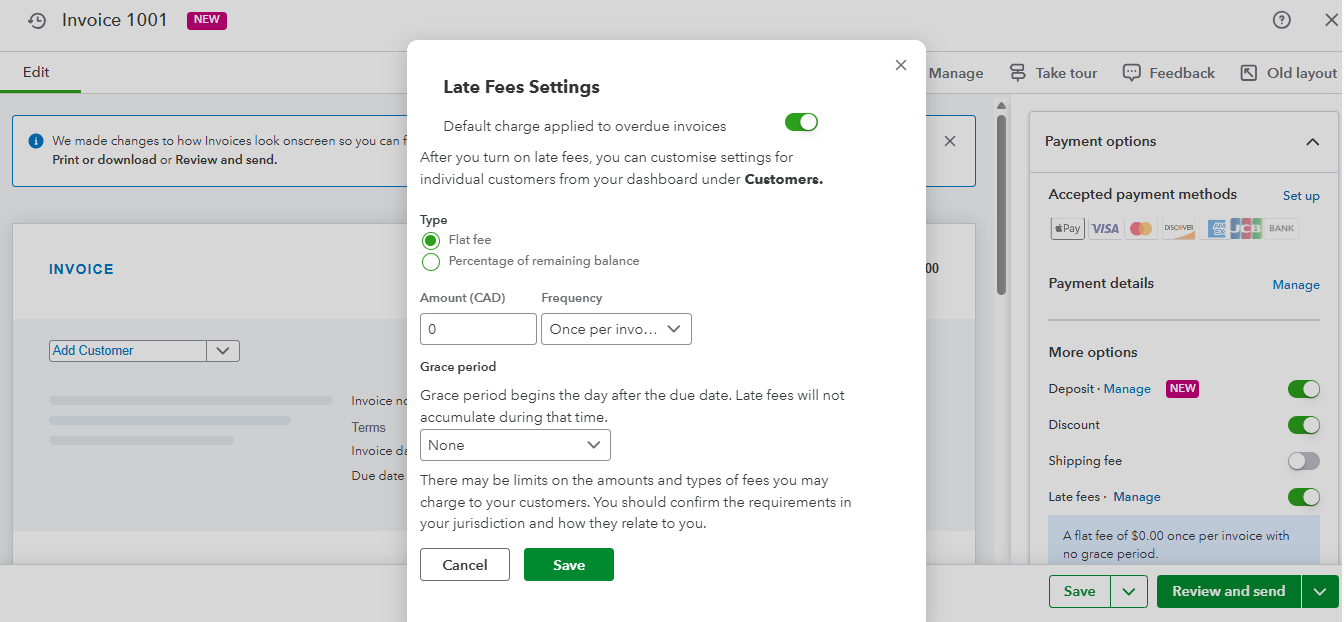
 

You can check out this link for reference: Turn on automatic late fees.


Please feel free to reach out if you have any further questions or concerns. We’re always here to help.

klderksen
Level 1

My client has QB Online Plus and there is no option to set up automatic late fees on customer invoices. However, when I go back to the Accountant page, I can set it up?

Thank you James, however I'm not seeing these items on my clients page?  I do see it on my main page, and can follow your steps. 

Need to get in touch?

Contact us