Turn on suggestions
Auto-suggest helps you quickly narrow down your search results by suggesting possible matches as you type.
Showing results for
Is anyone else having trouble getting the payroll update? My subscription is active, updates are on automatic. The other updates have run but I can not see a payroll update nor does one happen when I run all updates.
Hi bookkeepingerin, thank you for the detailed information you shared, and I appreciate the steps you’ve taken to check the payroll update.
To further assist you, could you verify the payroll tax table version you are currently using?
If you're using version 12234003 and downloaded the tax table on or after December 18, 2025, the updated amounts will take effect starting January 1, 2026, after downloading the product update.
Additionally, if you manually updated the TD1 amounts for any employee in the past or after setting up a new employee, the new tax table will not override these previously adjusted amounts. In this case, you would need to manually update the TD1 amounts moving forward.
Could you also confirm if any of your employees have been set up with TD1 amounts above the basic levels? If so, QuickBooks Desktop will automatically update TD1 amounts for employees who remain on the basic TD1 amounts for prior tax tables.
If you are not using tax table version 12234003, I recommend updating your QuickBooks Desktop to the latest release. Please note that the latest payroll tax tables are only available in QuickBooks Desktop 2024 or QuickBooks Desktop Enterprise Solutions 24.0. Once you’ve updated to the latest release, you can download the latest payroll tax table update again to ensure you have the most recent version.
Let us know if you have more questions or need further assistance.
We've followed the recommended (read ONLY) option to update from within the program.
we are trying to process payroll ending Jan2, 2026.
no new tax tables show up.
Updates say we are right up to date.
not working for us. thanks
Hello, @IronOakIT.
Thank you for keeping us updated on this thread. Allow me to share additional clarifications after following the steps my colleagues provided.
Please know that the message “No new tax tables show up” indicates that the latest tax table (12234003) downloaded successfully.
If the version number does not match the latest one, you can reset the update by doing the following:
After the reset, return to the Tax Table Info to confirm whether the table has been successful.
Let us know if you have further questions, we'll be right here to help you anytime.
Hello, I've tried everything. Updated new version of QB + release, update is on for payroll updates. Re-started my computer and still have the old version tax table which is 12134003.
Hi Sofia,
We hear you and appreciate your efforts in trying to get the latest payroll tax table update.
Could you tell us if you encountered any errors while updating your payroll tax table? For common errors, see this article: Get the latest tax table update in QuickBooks Desktop Payroll.
Also, when downloading the latest tax table, make sure to select the Download entire payroll update option to ensure the download completes successfully.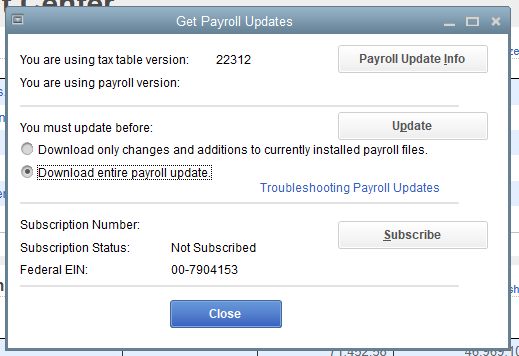
If you did not receive any errors and have already selected Download entire payroll update, I recommend reaching out to our Live Support team so they can look into this matter. Here’s how to connect with them:
Before you reach out, check their support hours to make sure they are available.
If you have any other concerns, feel free to leave a comment in this thread.
can not get 2026 payroll updates either. have done everything you have done and stilol will not update
Hi there, @mary53.
Since you've done everything but still can't get the 2026 payroll update, I recommend contacting our live support expert team to assist you further with this matter. They can screen-share with you to find out exactly why the 2026 update isn't showing up.
Here's how:
You can visit this article to check their availability: Get help with QuickBooks products and services.
If you have any follow-up questions about 2026 payroll updates, please don't hesitate to click the Reply button.
So I'm having the same problem. QB payroll prompts me to update like it should, it says download is successful and says to update before a certain date but that date is 7 days ago. I've reset all my updates and restated my computer and still no current payroll update. The thing that gets me is at this point it doesn't take any taxes out.
Any help would be greatly appreciated.
Hi there, Pmflooring. I understand the importance of updating payroll taxes and ensuring that taxes are applied correctly. After days of trying to reset and restart without any help, I recommend contacting our QuickBooks Desktop live support team.
Our QuickBooks Desktop live support team is here to help you with any payroll update issues. They can also provide solutions to ensure accurate calculations for your payroll taxes.
Please let me know if you have any additional concerns.
For all those reading this post, my original problem was solved by:
1 calling the official Quickbooks support - not a phone number in the chat!
2 they had me close QB, run it again as Admin,
3 then in Get Updates click "Reset Updates" checkbox and download updates
- this redownloads everything in the Updates folder
4 quit, then run Quickbooks normally, and it will say "updates exist" - go ahead an apply them.
5 afterwards may tax tables show the updated 2026 info
Yes,,,I am trying to prepare the Form 941 for the first quarter of 2026, my payroll account is active and I have uptdated the latest payroll update.....Can anyone help?
I have the latest update, however, my forms are still 2025. Anyone else have this?
Hi there, Gigi and Teri. As we are still in the first quarter, the 2026 Forms, 941 form, and the associated tax tables have not yet been finalized. We are actively working with the IRS to incorporate the latest quarterly forms and filing updates. Please expect a system update during the first week of April, which will include the updated tax tables and the new 2026 quarterly forms.
Check this out for the most recent info: Download the latest payroll tax table update for QuickBooks Desktop.
Feel free to leave a comment below if you have any additional questions.
I've tried everything and nothing seems to work. Still can not get the payroll updates for 2026
Ever since they stopped the quick books desktop at 2024 I have trouble updating
I just did what you suggested and FINALLY it worked for me. I was able to do the update and updated my payroll service and all is good now. THANK YOU
I can't get the 941 Quarterly Report to change from 2025 to 2026. I'm trying to file Quarter I report and it keeps giving me the error message.
Hello there, Pjp2. The reason you are unable to access the 941 Quarterly report is that QuickBooks requires a specific Payroll Update to unlock the new 2026 forms. The software needs to download the latest government-approved templates before you can run a 2026 report.
To help us provide a more tailored solution, could you please share the specific error message you're encountering? A description of the details or a screenshot would be very helpful.
Additionally, I’ve included this resource to assist you with the update process: Update QuickBooks Desktop to the latest release.
Let us know if you have more questions or need further assistance.
This worked for me. I now have the 2026 Payroll updates, however, when I go to pay my liabilities, it is blank, but when i go to the PD7A form it is showing the payroll. Strange
Hi there, mary53.
I can see that you posted twice in this forum. Please click the link to get redirected to the original post answered by my colleague: https://quickbooks.intuit.com/learn-support/en-ca/other-questions/re-payroll-liabilities/01/1608508#....
To keep the conversation streamlined, please leave any follow-ups there.
If you have any other questions, you can always visit us.


You have clicked a link to a site outside of the QuickBooks or ProFile Communities. By clicking "Continue", you will leave the community and be taken to that site instead.
For more information visit our Security Center or to report suspicious websites you can contact us here


