Resolving your inability to edit invoices would depend on the situation, Cforltd.
To verify, did you receive a specific error code while trying to modify the invoice? If so, may I ask for its full description or a snapshot of the notification? Providing us with the details could help us relay a precise resolution regarding the issue.
For reference, these are the steps to edit an invoice in QuickBooks:
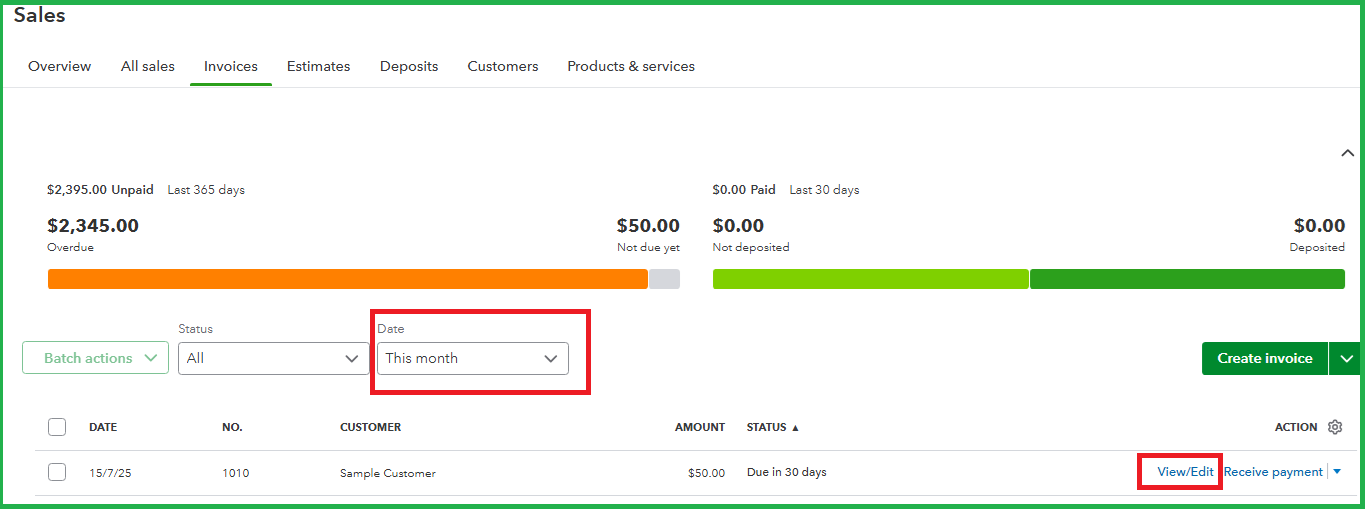
- Go to the Sales menu, then Invoices.
- Enter the appropriate Date range.
- Locate and click the View/Edit option under the Action column.
- Apply the necessary changes.
- Once done, hit Save and close.
Please know that managing sales transactions requires specific company access. To ensure you have the appropriate role for editing invoices, please review this resource: User roles and access rights.
If you're allowed to edit an invoice based on your user access but aren't able to, I recommend clearing your regular browser's cache and cookies. Removing these components allows the platform to regain its full capacity. Once you encounter the same result, you can consider using another supported browser.
You can also customize your sales forms according to your business reference. Doing so allows you to add or modify their available details and overall appearance.
When you're ready to provide more details about your concern, kindly click the Reply button.


