We can set this up as a payroll item first and add the created clergy allowance to the employee, finance232.
Here's how to do it:
- Go to the Payroll menu and select Employees.
- Click Edit payroll items.
- From the New Payroll item dropdown, choose Pay type.
- Select 'Allowance' as the pay type, since this is a taxable payment.
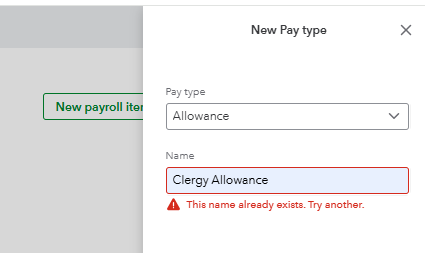
- Enter a name such as "Clergy Allowance", then Create.
Once done, let's assign it to the employee by following the steps below:
- Go to the Payroll menu and then select Employees.
- Select the employee's name.
- From the Additional Pay types, click the Add button.

- Choose the pay type you created and enter the necessary details, such as the amount.
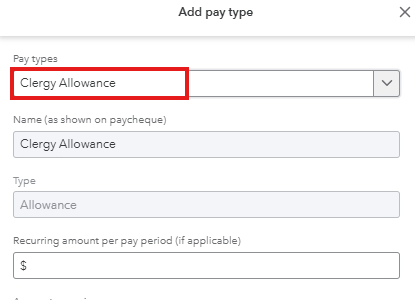
- Click Save once done.
If you have more questions or QuickBooks concerns, please leave a reply below. We'd be glad to assist.


