Thanks for posting here in the Community forum, @dhtrenholm.
Since the Payroll Suspense account isn't a default account in QuickBooks Online (QBO), so I think you've manually set this account up. If so, may I know how did you configure it?
Please note that QuickBooks relies on the mapping you've established in your Payroll settings. Ensure that this account has been properly set up within your payroll settings. These settings designate how each component of your payroll transactions is recorded in the Chart of accounts. Proper mapping ensures that each type of movement is recorded in the correct accounting ledger.
Since you've manually created this account, you'll have to review the transactions posted to it. You can transfer the funds from your Payroll suspense account to your actual bank account. However, doing so will simply adjust the account's balance and it will not modify any existing transactions as QuickBooks serves primarily as a recording tool only.
Here's how to transfer the funds:
1. Go to +Create and select Transfer.
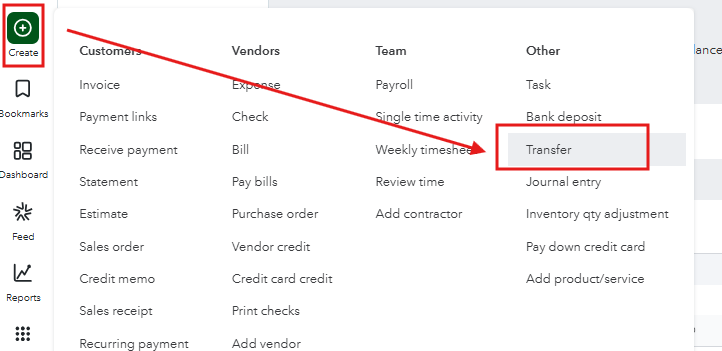
2. In the Transfer Funds From field, choose the Payroll suspense account.
3. In the Transfer Funds To field, select your actual bank account.
4. Enter the amount to transfer, then click Save and close.

Please let us know if you have any additional questions or need further clarification.


