Turn on suggestions
Auto-suggest helps you quickly narrow down your search results by suggesting possible matches as you type.
Showing results for
I'm filing the T4's for 2025 using the xml and manually uploading it in the CRA portal. I'm getting an "We are unable to process your submission because the T619 electronic transmittal record contains either empty tags or missing mandatory tags." error. How do I fix this?

Hello there, @Christessa.
When filing your T4, ensure that your Representative Identifier (RAC) in QuickBooks Online is different from your Business Number (BN). If you find that they’re the same, you’ll need to update the RepID to the correct one.
Next, review your XML file to verify that the Business Number matches the account number you use to log in to the CRA website.
To find your Business Number. Follow these steps:
Once these corrections are made, your submission should process successfully.
If you have any further questions or need assistance with QuickBooks, feel free to click the Reply button.
The only reference I can find to the Representative Identifier (RAC) is the accountant version of QBO, which I'm not using!
Hi there, Christessa.
We understand how confusing it can be when the information you're looking for seems tailored to a version of the software you're not using. Let me provide information about this below.
Please note that the Representative Identifier (RAC) is a unique code specifically assigned to accountants. That's why we recommend reaching out to your accountant so they can provide their RepID and assist you with your T4 filing. Working together with your accountant will ensure the filing process proceeds smoothly.
If you have any further questions or require additional assistance, please add a comment below. We are here to help.
This isn't acceptable. Not all small businesses use an accountant who uses QuickBooks!
We need to be able to submit our information electronically to the CRA and part of the reason we use QB is to make our lives easier, not cause frustration when we are unable to perform tasks that the program is designed to do.
We are having the same issue. Have you had any success submitting your XML file?
The Rep ID number is the first 7 digits of your Account (Business) Number.
So for example, acct # 123456789RP0001, Rep ID is 1234567. I presume this is the same for all.
Where do I enter the Representative Identifier (RAC) in QB?
Thank you for reaching out, @Ham-bookkeeper. To ensure your T4, T4A, or T5018 slips are accepted by the CRA when filing on behalf of your client, you'll need to add your 7-digit RepID in the Payroll settings.
Here is exactly where to enter it:
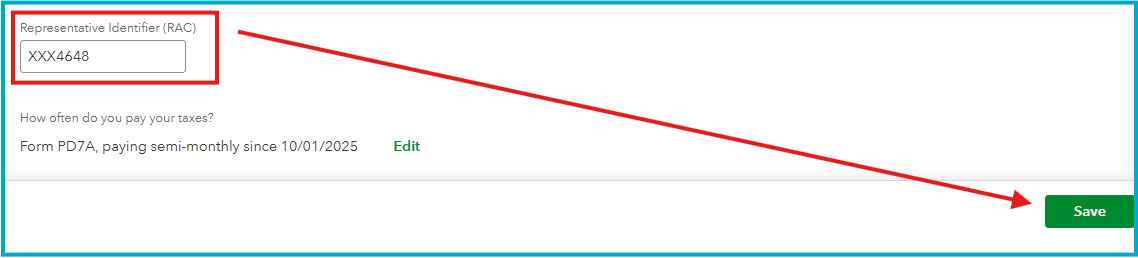
While T4S adheres to the above setting, QuickBooks often requires you to enter or verify this RepID specifically at the moment you generate the XML file.
For a deep dive into the specific CRA requirements for this year, check out this guide: Update settings for T4, T4A, and T5018 electronic filing to the CRA.
I’m glad to help if you need anything else. For now, I hope this helps you file the slips without invalid-format errors. Happy filing.


You have clicked a link to a site outside of the QuickBooks or ProFile Communities. By clicking "Continue", you will leave the community and be taken to that site instead.
For more information visit our Security Center or to report suspicious websites you can contact us here


