I understand how beneficial this could be for users who prefer not to use the AI functions in QuickBooks Online (QBO), get stuffed. The option to disable all AI functions in QBO is unavailable.
I recommend submitting a feedback request to our product engineers. Our product engineers regularly review feedback submitted via QuickBooks, and they may consider adding this option in the future.
Here’s how:
- Log in to your QBO account.
- Click the Gear icon, then select Feedback.
- Share your experience and suggestions, then click Next.
In the meantime, you can opt out of the new banking page under Bank Transactions. This will disable the AI-powered categorization and collaboration features.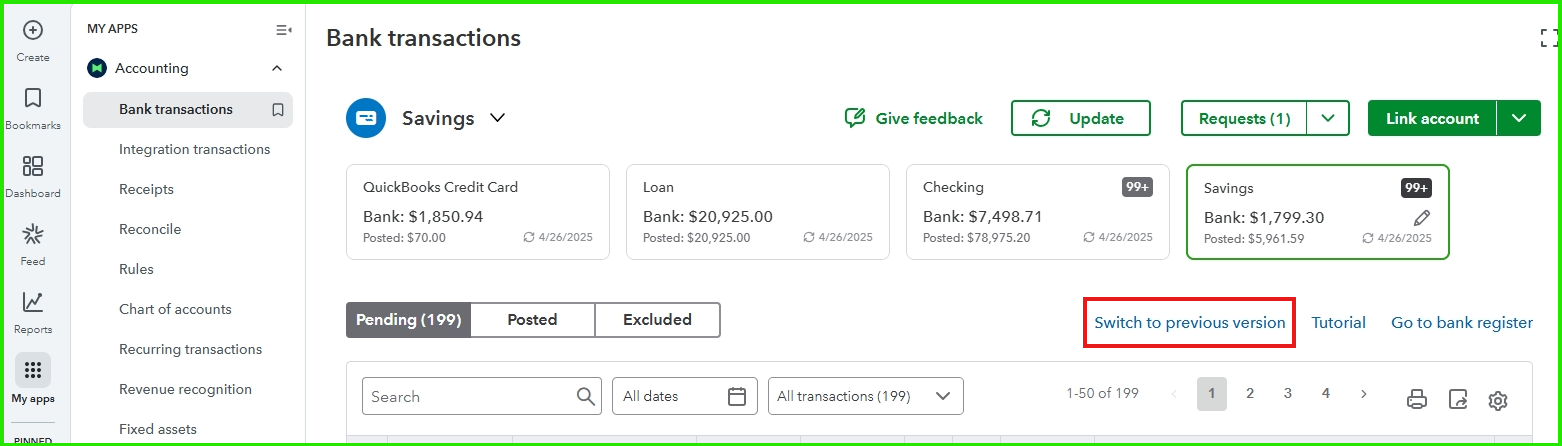
If you have additional questions or concerns about QuickBooks, feel free to share them here in the Community. We're always happy to help you out.


