Turn on suggestions
Auto-suggest helps you quickly narrow down your search results by suggesting possible matches as you type.
Showing results for
I use QuickBooks Desktop. When I prepare to do my quarterly unemployment tax (employer paid) I use the form provided by QB's under the File Forms tab, AL Report UC-CR4. I use this form to file and pay online with the state of Alabama. Using the amounts on this form, the state amounts then match and I pay online. Here is where my problem is: When I go under the Pay Liabilities tab to mark this tax as paid, the amount on this liability check does not match the printed form and state amount. If I run payroll item detail report, or payroll summary report, or employee earnings report, all these reports match the payroll liability amount and not the file form amount. The difference can vary between a few cents to ten cents. I am sure this is due to rounding.
1. Why is this happening, and how can I prevent it in the future?
2. Is there a way to track where, or which employee, is creating the discrepancy?
2. What is the best way to handle the discrepancy? If I change the amount on the liability check it leaves a balance showing on the pay liabilities tab.
If this is going to be a common, unpreventable problem, I would like to know the correct measures to take each quarter to fix it.
Solved! Go to Solution.
Allow me to chime in, Troe.
Entering a prior payment and selecting Affect liability accounts but not bank account is indeed the correct approach when you have paid your SUTA tax liability outside of QuickBooks.
Even when following the correct procedure, discrepancies can still occur due to factors such as rounding differences, payroll tax item setups, or historical data entries, as my colleague GianSeth_A described in detail.
Given that adjustments to accounts can affect your financial reporting and tax obligations, I recommend consulting with your personal accountant or tax advisor. They can provide tailored guidance to ensure your QuickBooks adjustments align with your overall accounting and compliance requirements.
If you don't have an accountant yet, you may want to visit our QuickBooks Certified ProAdvisor website to assist you in finding a qualified professional.
I'll keep this thread open for future discussions.
Ok thank you. I will speak with our accountant. Thank you all for
taking the time to provide help with this situation. It is greatly appreciated.
Yes, Troe. You're right. It is due to rounding. Also, QuickBooks calculates payroll items per employee and then totals them, whereas the state calculates the total differently or rounds only the final amount.
Why is this happening, and how can it be prevented?
QuickBooks calculates payroll liabilities for each employee individually and rounds each amount before totaling, whereas state forms round the total at once. To minimize discrepancies, ensure accurate entry of payroll items and tax rates, and maintain consistent decimal settings in QuickBooks. However, rounding differences (a few cents) are unavoidable.
Is there a way to track which employee creates the discrepancy?
You can filter the Payroll Item Detail report by unemployment tax to see individual employee amounts. It helps identify rounding differences, but finding exact cent discrepancies per employee is impractical, as the rounded total is the main issue.
What is the best way to handle the discrepancy?
Enter or correct all historical payroll liabilities and payments on the accurate dates. When entering historical payments or liabilities, always select "Do Not Affect Payroll Liabilities." This action prevents QuickBooks from recalculating payroll tax liabilities on those transactions, avoiding rounding errors.
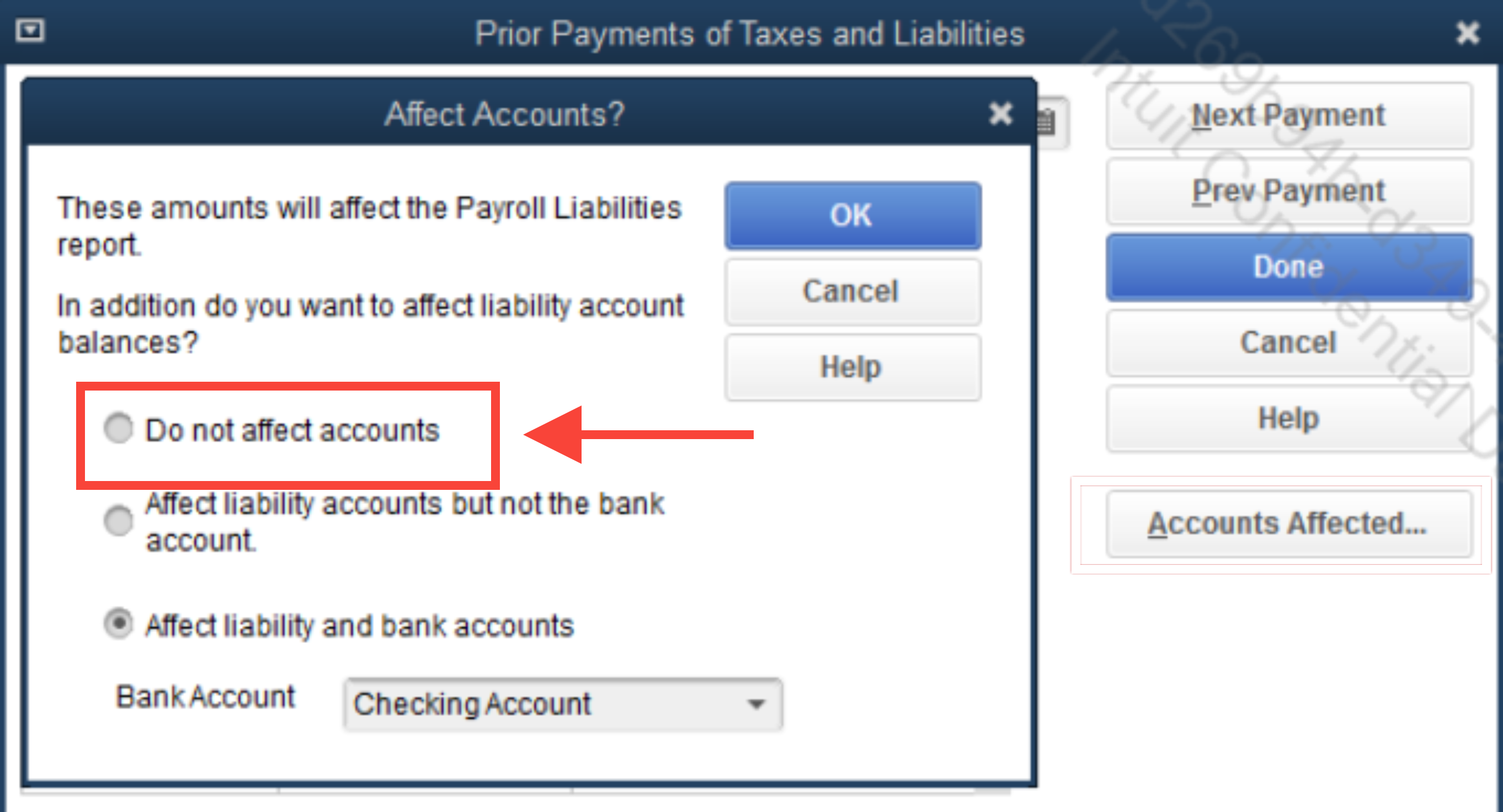
By accurately entering historical data, the future liability amounts will align more closely with the figures on your state forms and file forms, reducing potential discrepancies.
If you have any questions, please let us know. We're here to assist you.
Can you please elaborate on this part?
What is the best way to handle the discrepancy?
Enter or correct all historical payroll liabilities and payments on the accurate dates. When entering historical payments or liabilities, always select "Do Not Affect Payroll Liabilities." This action prevents QuickBooks from recalculating payroll tax liabilities on those transactions, avoiding rounding errors.
By accurately entering historical data, the future liability amounts will align more closely with the figures on your state forms and file forms, reducing potential discrepancies.
To pay the liability for that quarter I click on the liability tax, uncheck print now since I paid online, save and print summary. Thats when the tax difference populates. I corrected it this time by "Entering A Prior Payment" and Create Payment. On "Accounts Affected" I chose "Affect liability accounts but not bank account".
So is this not right avenue to take?
How do I correct the "Accounts Affected" I entered?
Wasn't sure if you saw my reply asking for help with the last instructions you gave me?
Allow me to chime in, Troe.
Entering a prior payment and selecting Affect liability accounts but not bank account is indeed the correct approach when you have paid your SUTA tax liability outside of QuickBooks.
Even when following the correct procedure, discrepancies can still occur due to factors such as rounding differences, payroll tax item setups, or historical data entries, as my colleague GianSeth_A described in detail.
Given that adjustments to accounts can affect your financial reporting and tax obligations, I recommend consulting with your personal accountant or tax advisor. They can provide tailored guidance to ensure your QuickBooks adjustments align with your overall accounting and compliance requirements.
If you don't have an accountant yet, you may want to visit our QuickBooks Certified ProAdvisor website to assist you in finding a qualified professional.
I'll keep this thread open for future discussions.
Ok thank you. I will speak with our accountant. Thank you all for
taking the time to provide help with this situation. It is greatly appreciated.
You're always welcome, Troe.
We’re glad to hear that the advice shared by my colleagues has helped you manage the SUTA tax liability discrepancies you’ve experienced in QuickBooks Desktop. Our goal is to support you in navigating these payroll and tax processes as smoothly as possible.
If you have any further questions or need assistance with QuickBooks Desktop or related concerns, please don’t hesitate to reply to this thread. We’re here to help. Have a great day!


You have clicked a link to a site outside of the QuickBooks or ProFile Communities. By clicking "Continue", you will leave the community and be taken to that site instead.
For more information visit our Security Center or to report suspicious websites you can contact us here


