Hi there, Shauna.
This error generally occurs because the CRA updated their filing requirements for the T619, and your QuickBooks (QBO) file is possibly missing a mandatory transmitter field.
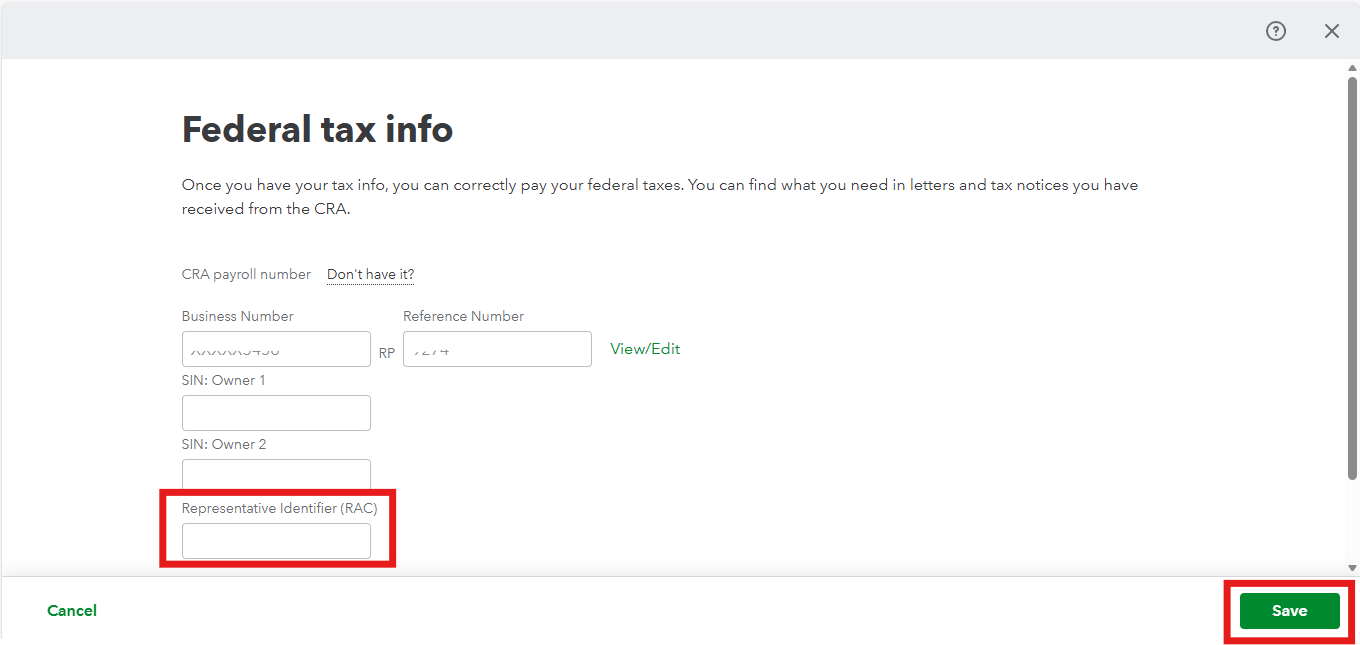
If you are an Accountant or Bookkeeper and you log into the CRA portal using a Representative identifier (RAC), your XML file must contain your RAC. If it doesn't, the CRA sees an empty tag where your ID should be. To resolve this:
- Go to the Gear icon and select Payroll Settings.
- Click on Federal Taxes.
- Look for the Representative Identifier (RAC) field. Ensure your RAC is entered here correctly.
- Click Save.
If you are a business owner using My Business Account (MyBA) or a Web Access Code (WAC), this error usually indicates missing contact details or an incorrect Business Number.
To fix this, navigate to the Contact information under Payroll Settings and ensure the Primary Contact Name, Email, and Phone Number are complete, as blank fields will cause the T619 tags to remain empty. Additionally, visit the Federal tax section to confirm your Business Number includes the required RP program code.
I'll keep an eye on this thread if you have any additional questions or concerns. Please don't hesitate to reach out.


