Turn on suggestions
Auto-suggest helps you quickly narrow down your search results by suggesting possible matches as you type.
Showing results for
Hello,
I need to match 2 payments from my customer in USD currency to one invoice in USD. When I try to do it, I get this error "The amount for the transaction is greater than the available amount in the downloaded transaction. "
I don't have this issue for transaction in Canadian dollars, this happens only with USD.
What should I do?
Thank you.

Hello SergeiG,
It's nice to see you reaching out here. Multicurrency can have some challenges when it comes to matching your transactions. However, QuickBooks Online provides the features you need, so you can match your transactions and reconcile your accounts with confidence. I would be glad to assist!
When issues such as this arise, it's usually related to the exchange rates used at the time of each transaction. You can recalculate the home currency value using current exchange rates. Here's how;
1. Open your Settings ⚙, then Currencies
2. Under the Actions column, select the ▼ dropdown menu, for the currency you want to adjust, then Revalue Currency
3. Enter the Revalue date
4. Decide whether you'd like it to be based on the Market rate or a Custom rate
5. Hit Revalue and save
Note; Only one exchange rate can be saved per day per account.
You're all set, and you should be able to match your transactions and reconcile your account!
If you have other questions, feel free to touch base with us again. We are here to help!
Hello Trish_T,
Thank you for the answer. I found this feature in my account, but before do it, I would appreciate you for some clarifications:
- In simple words, what actually Revalue date feature does?
- If date of invoice is December 9th, and transactions dates are December 9th and December 10th, what date should I choose as Revalue date?
Thank you.
Hello SergeiG. Glad to hear back from you. Revalue date refers to the date that you're revaluing the currency for. This date can be today or a day in the past. I recommend consulting with your accountant for expert advice on which date to use so your books can remain accurate. In the meantime, let me know if you have other questions. I'm here to steer you in the right direction.
This absolutely does not work with other currencies. If the currency that is trying to match with an invoice is not exactly the number from the downloaded transaction, you will get this message. You have to make multiple invoices in order to make this work, you can't do "part" payments with foreign currencies in Quickbooks Online. It's completely broken.
Is this bug going to be fixed anytime soon? It’s ridiculous not to be able to partially match transactions.
Were you able to make it work somehow? I really need the ability to partially match foreign transactions as I have bank accounts in different currencies.
Hi there, @MrRidley . QuickBooks Online (QBO) doesn't support partial matching when the invoice and the bank transaction are in different currencies.
QBO can only match payments to invoices when both sides use the same currency, so once the bank converts the amount, the system can't partially apply it. The only workaround for now is to record the payment in the customer's currency using Receive Payment, then manually record the currency conversion in the bank account where the funds were deposited.
If you have follow-up questions, please don't hesitate to click the reply button.
But both my bank account and the customer are in the same currency (Euro). How come it doesn’t work? I’m using the multicurrency feature, but my main QBO currency is USD.
Hello, @MrRidley. Since your bank and customer use the same currency, you can proceed with a partial payment. The current issue stems from a change in the implementation rate, which requires an exchange rate revaluation.
We will recalculate the home currency value using the current exchange rates for the Euro to help you match your partial payments. Here's how:
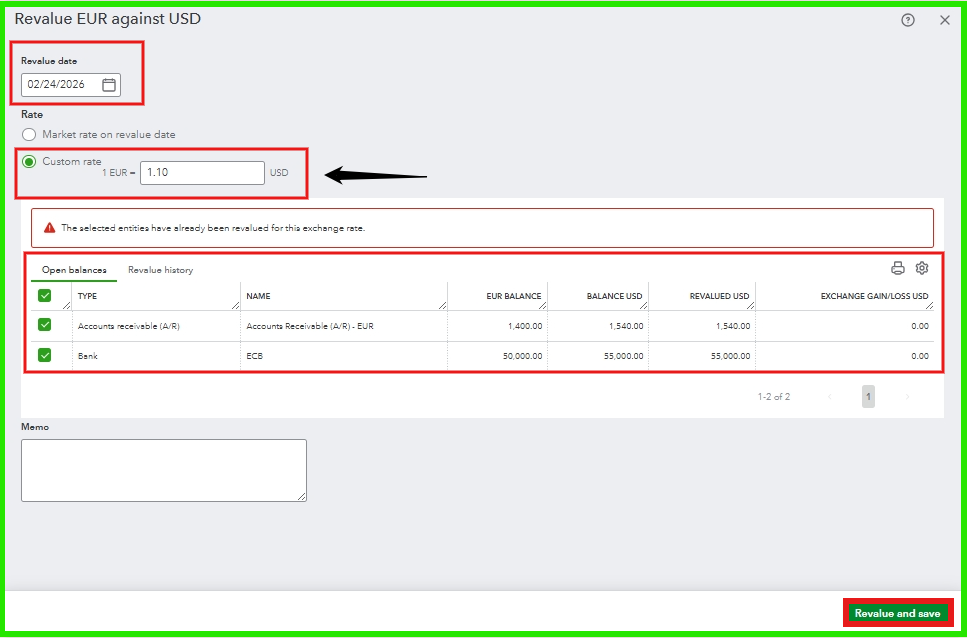
For further details, you can refer to this article: Enter home currency adjustments for your foreign balances in QuickBooks Online.
This is the result after revaluing your exchange rate; you can now match the partially paid amount.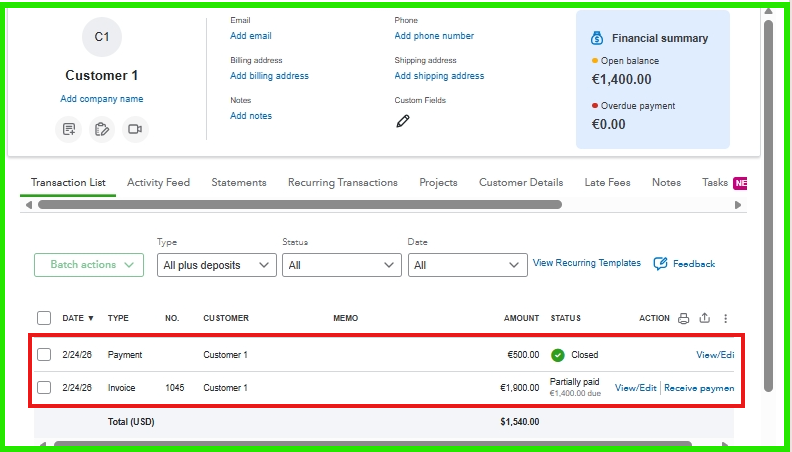
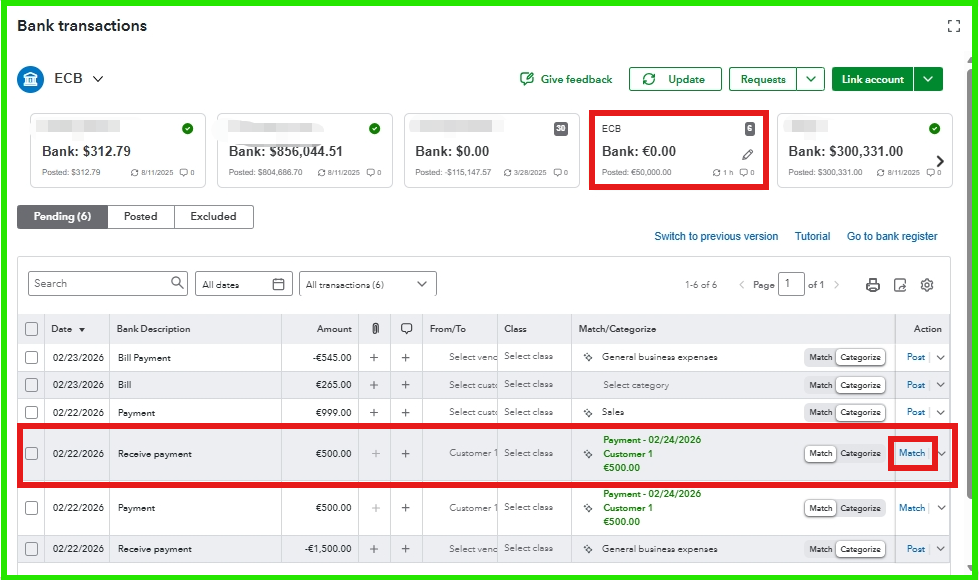
If you have already revalued your home currency but the issue persists, I recommend contacting our Live Support team for assistance. They can investigate the problem using specialized tools and provide specific guidance to help you resolve the issue.
If you have any more questions or encounter further challenges, please don't hesitate to reply or start a new post. I'm here to help. Thank you for sharing your concerns!
This simply doesn’t work and whenever I hit match, it wants me to reconcile the difference, which is not the idea.
Hello, MrRidley. When using QuickBooks Online with USD as your home currency for euro transactions, each bank feed match recalculates the exchange rate, leading to more frequent triggers of the reconciliation screen.
Since I can't see your specific bank setup or exchange rates, the best way to address this without disrupting your records is to talk with our Live Support Team. They can hop on a screen-share, see exactly why the Match isn't clicking, and walk you through the fix in real-time.
To reach our Live Support Team in QuickBooks Online (QBO), start by clicking the Help icon located at the top of your account. From there, select the Search tab and then click on Contact Us at the bottom. You’ll need to type in your question and click Continue. Finally, follow the on-screen instructions.
To determine the most convenient time to reach, please check our support hours.
If you have questions, don't hesitate to return to this thread.
I engaged with support twice - the first time the lady from the Philippines told she'd call me back as she couldn't solve the problem via screen share and it she never did at the planned time the next day.
The second time was today - same story. I was told someone would call me within 30 minutes and they never did.
I wish Intuit focuses less on the useless AI "functions" that don't even work right and more on the simple problems their customers (real businesses with real revenue) have. You can never get in touch with an engineer or someone who could give you an adequate answer - it's just that scripted "Is there anything else I can do for you today" fluff that is utterly useless. Zero problem-solving desire on behalf of support... I wouldn't even call them support.


You have clicked a link to a site outside of the QuickBooks or ProFile Communities. By clicking "Continue", you will leave the community and be taken to that site instead.
For more information visit our Security Center or to report suspicious websites you can contact us here


