Hey Accu1,
We couldn't agree more. You cannot put 40 hours in there as you'd be admitting liability for that whole amount even if someone reduces hours to an average of 6 per day. After some testing we decided to do our own thing but still utilize the QBO Sick Pay feature. You're welcome to copy what we did, here's an excerpt of what I sent to my clients explaining the work-around we had to use. (Better than using the Gear Icon for Feedback)
There's a couple of Key work-arounds we need to highlight in order for this to work properly.
- Quickbooks is only able to Manage Sick Pay as an Hourly allowance
- The Legislation is for 5 DAYS @ an average days pay
- An Average days pay is calculated WHEN they take a sick day
- We cannot 'guess' in advance the hours a person may be entitled to
- The good news is that it will reset the 5 days on work anniversaries as intended
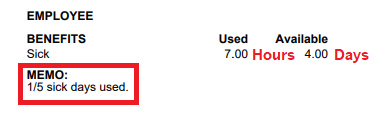
Because of these facts we have elected to use the QBO sick pay policy but input 5 hours as "Days". This means so that the "Available" balance which an employee sees on their payslip is actually "Days" (See below)
When we pay out a Sick day to an employee we then calculate the average hours they are entitled to and pay that out. This will be paid at their standard hourly rate and will show as hours "Used". We will then adjust the "Available" # to be less one day. See the image of a payslip below for more clarification. We also intend to make a memo on that payslip to note how many days have been used so far.
We realize this may be a little confusing at first but after testing various scenarios internally this method requires the least effort overall. Please update your employees on this change and let them know that "Available" means Days so there's less confusion.
If you want to know how to implement the process in practice send me a message and I'll forward you those instructions as they're a little longer. So far it's working for us. We've had maybe 10-12 claims already across a few clients.
I hope this helps get you on the right track
Please mark this answer as a helpful solution if it answers your question
Thanks
McBride Bookkeeping