You can navigate to the Receive payment option to process credit card payments for multiple invoices, Renee.
To begin, could you clarify what you mean by getting your widgets back for processing payments? Any details you can share will help me provide a solution specific to your needs.
Meanwhile, you can follow the steps below to record credit card payments for multiple invoices:
- Click the +Create button and select Receive payment.
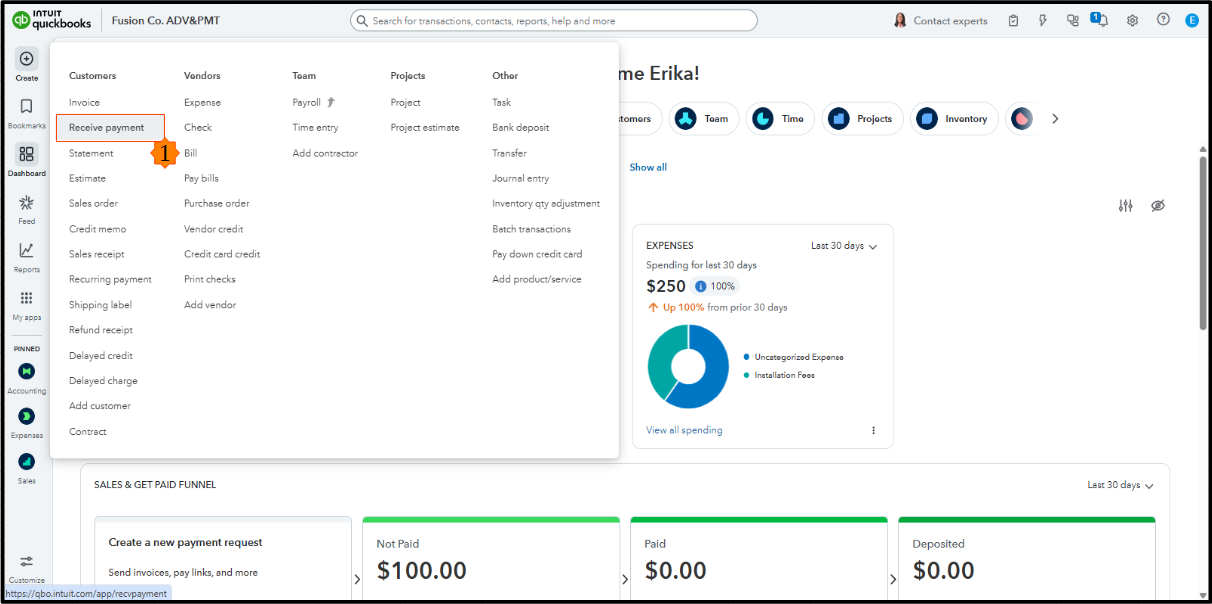
- Enter a customer from the Customer dropdown menu.
- Set the Payment Date to the date the payment was received.
- Select the Payment method dropdown menu and choose Credit card.
- If you have QuickBooks Payments, select Charge a New Payment to enter your customer's card information directly in this window.
- Under the Outstanding Transactions section, choose the open invoices you want to apply the payment to.
- When finished, click Save and Close or Record and close.
Leave a comment below if you have any questions about this process or other QuickBooks-related topics.


