Our top goal is updating your QuickBooks subscription, @proyer. And I was hoping we could get this done as soon as possible.
I appreciate everything you did to upgrade your membership. Subscription upgrades via Google Play are currently unavailable. With this, I'd suggest getting in touch with our Customer Care Team. Our professionals can assist you with the Google to Intuit Billing partner billing transition. After that, you can therefore upgrade it.
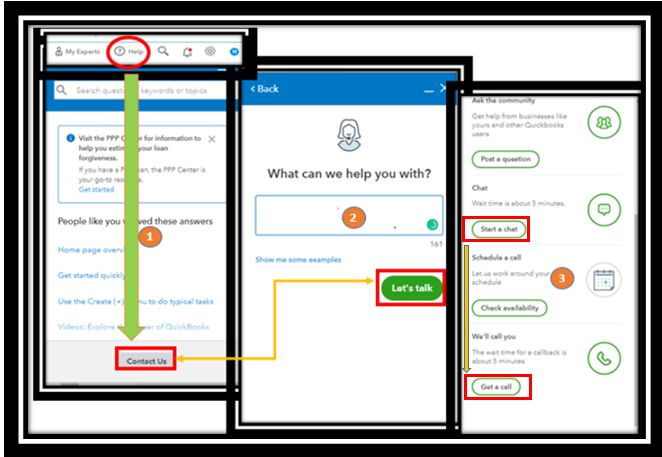
Go as follows:
- Go to the Help menu, then click Contact Us.
- Type your concern in the box and tap Let's talk.
- Choose either Get a call or Start a chat.
- Complete the required data and submit the request.
Make sure to contact them within business hours to ensure a swift response.
Did you know that you can use Intuit Payment Wallet to create and retrieve payment methods for all of your QuickBooks subscriptions? Check out this article to learn more about this feature: Add and manage your subscription payment method using Intuit Payment Wallet.
Additionally, check out these articles below on how to update billing info, payment method, upgrade, downgrade, and print subscription invoices:
You're more than welcome to ask any other concerns regarding your subscriptions. If you'd like to know more about other Quickbooks processes, let me know, and I'll gladly lay down some guides. I'll see you again soon.




