Yes, you can see if the invoice has been viewed by your customer using the View activity feature in QuickBooks Online (QBO), Rebecca96.
Here's how:
- Hover over the My apps icon, click the Sales & Get Paid drop-down.
- Select the Invoice, then choose any invoice that you want to view.
- Hit the drop-down arrow View activity.
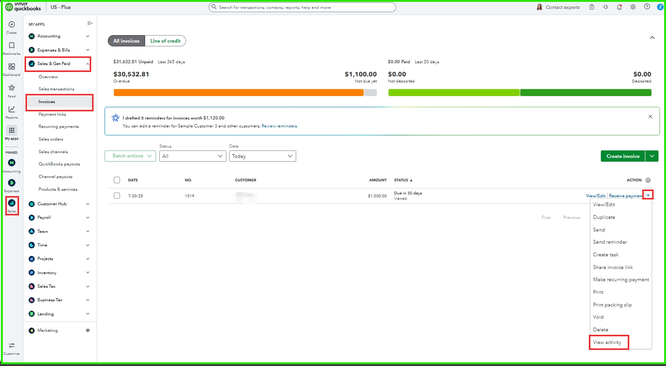
- From there, you can see the status of your invoice.

There is another way to see if the customer has viewed the invoice. Select the invoice, click Payor view, choose Status: View, and click the drop-down arrow.

You can also check out this article for detailed information about viewing your invoice status: View transaction and invoice status at a glance.
Consider QuickBooks Live Bookkeeping to streamline accounting, maintain accurate financial records, and access professional support, freeing you to focus on growing your business.
Let us know if you need assistance by clicking the Reply button.




