Turn on suggestions
Auto-suggest helps you quickly narrow down your search results by suggesting possible matches as you type.
Showing results for
Get 50% OFF QuickBooks for 3 months*
Buy now
I'm delighted to extend a warm welcome to the Community space, NWI Tax LLC.
In order to provide you with accurate information and a tailored solution, we kindly ask for more specific details. Specifically, we would like to understand the particular report you wish to generate and the transactions you intend to include in said report. This information will enable us to furnish you with a suitable report and necessary instructions.
Thank you very much, and we eagerly await your response. Take care and stay safe!
I created a custom report with expenses by vendors.
i have totals for each vendor and I want to add a total amount for all vendors which is the grand total.
Thanks
Theos
I appreciate what you have done so far with your reports, Theo.
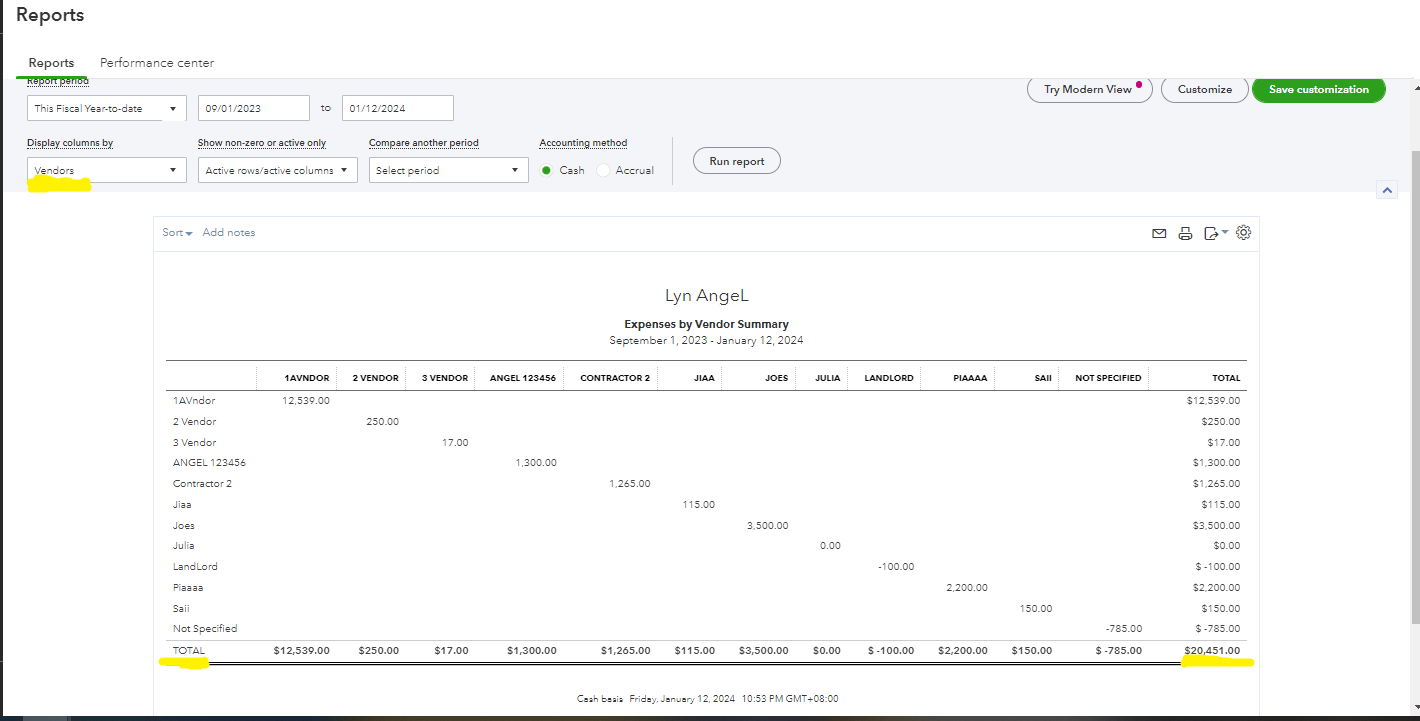
Since you already made a custom report, you can follow these steps to create a report with the total of your expenses:
After that, if the report shows up, you can see the total of the expenses you've made by each vendor.
I've attached a screenshot for your visual reference.
Also, you can check this article to guide you on your vendor reports: Run a report with vendor totals.
Additionally, I've added an article that you can use as a reference when you decide to pay your vendor: Manage outstanding balances for customers and vendors in QuickBooks Online.
Feel free to post anytime if you have more queries about QuickBooks Online reports. We're always here to assist you. Have a good one.


You have clicked a link to a site outside of the QuickBooks or ProFile Communities. By clicking "Continue", you will leave the community and be taken to that site instead.
For more information visit our Security Center or to report suspicious websites you can contact us here


