Turn on suggestions
Auto-suggest helps you quickly narrow down your search results by suggesting possible matches as you type.
Showing results for
Get 50% OFF QuickBooks for 3 months*
Buy now
Hello, @tracy23.
QuickBooks re-sorts lists based on the first three digits of the account number. You can always sort the account number on your Financial reports. Just click on the arrow-down beside the Sort By field.
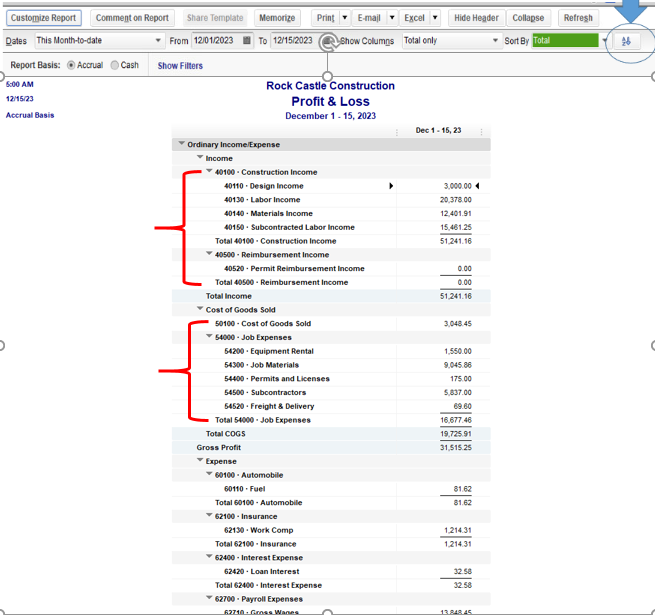
You have also an option to export the report in Excel and arrange it from there. Let me guide you how:
I've also included an article for your reference on how to transfer data: Export reports as Excel workbooks in QuickBooks Desktop.
You can customize any reports based on the needs of the business. For the detailed guide, please check this article: Customize company and financial reports.
Let me know if you have other concerns in your account. I'm always here to help. Have a great day!
This will not work for my sub accounts. Does QB enter the accounts in the order I put them into my budget? Should I reorder those?
Thanks for the update and clarification, tracy23.
The accounts in your financial reports are sorted by type and account number in ascending order. The option to re-sort the accounts shown in the Budget page is unavailable. You can export the report to Excel and re-order it from there.
I have a reference that you can check that will help you on how to manage the budgets feature.
If there's anything else that you need help with, you can always reach out to me.


You have clicked a link to a site outside of the QuickBooks or ProFile Communities. By clicking "Continue", you will leave the community and be taken to that site instead.
For more information visit our Security Center or to report suspicious websites you can contact us here


