Turn on suggestions
Auto-suggest helps you quickly narrow down your search results by suggesting possible matches as you type.
Showing results for
Get 50% OFF QuickBooks for 3 months*
Buy nowI have previously printed multiple checks that need to be brought into Quickbooks and I don't like having to enter ck#7500 and then reopening to enter 7501 and then again for 7502 and on and on
Solved! Go to Solution.

Hello and welcome to the Community, wbcaa2013.
To save time and avoid reopening the "Write Checks" window for each entry, use Save and new instead of Save and close when entering multiple checks written outside of QuickBooks.

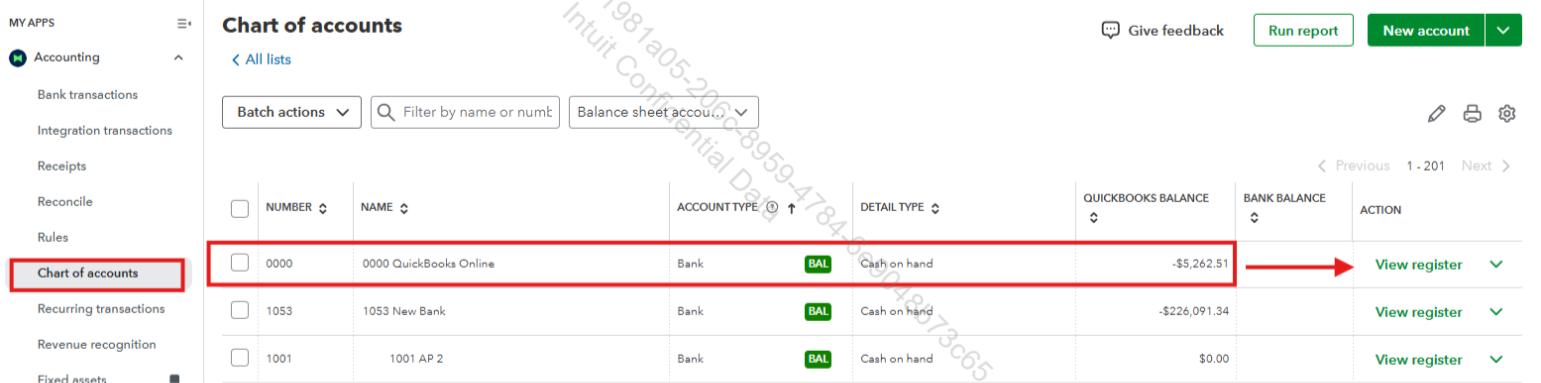
On the other note, you can record checks directly on the Chart of accounts page, which opens a blank form for the next check, allowing quick entry without reopening the window, ideal for handling multiple checks efficiently.
Here’s how:
1. On your dashboard, go to My apps on the left sidebar.
2. Click Accounting.
3. Under Accounting, select Chart of accounts.
4. Ensure you select the correct bank account.
5. Click View register.
6. Under the Date field, click the drop-down arrow and select Check.
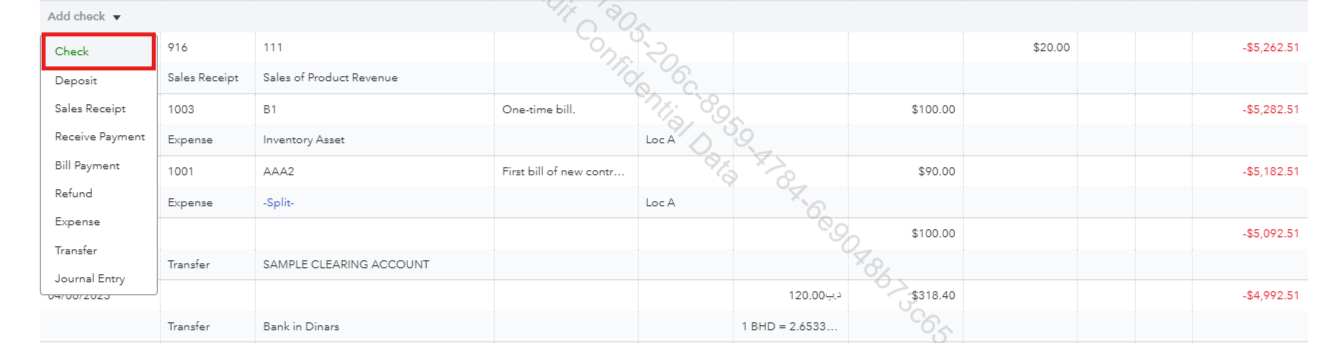
7. Complete the required fields.
8. Click Save.

If you have any additional questions or concerns related to QuickBooks, feel free to reply to this thread.
Hello and welcome to the Community, wbcaa2013.
To save time and avoid reopening the "Write Checks" window for each entry, use Save and new instead of Save and close when entering multiple checks written outside of QuickBooks.
On the other note, you can record checks directly on the Chart of accounts page, which opens a blank form for the next check, allowing quick entry without reopening the window, ideal for handling multiple checks efficiently.
Here’s how:
1. On your dashboard, go to My apps on the left sidebar.
2. Click Accounting.
3. Under Accounting, select Chart of accounts.
4. Ensure you select the correct bank account.
5. Click View register.
6. Under the Date field, click the drop-down arrow and select Check.
7. Complete the required fields.
8. Click Save.
If you have any additional questions or concerns related to QuickBooks, feel free to reply to this thread.
Hi, wbcaa2013.
I just wanted to follow up to check if the resolution we provided helped resolve your issue.
Please let us know if everything is now working as expected or if you’re still experiencing any problems.
We’ll be glad to assist further if needed.


You have clicked a link to a site outside of the QuickBooks or ProFile Communities. By clicking "Continue", you will leave the community and be taken to that site instead.
For more information visit our Security Center or to report suspicious websites you can contact us here

