Turn on suggestions
Auto-suggest helps you quickly narrow down your search results by suggesting possible matches as you type.
Showing results for
BLACK FRIDAY SALE 70% OFF QuickBooks for 3 months* Ends 11/30
Buy now
I am yet another one in the same boat having issues with Quickbooks Desktop and the Home Depot Commercial Card.
I noticed there are two separate Home Depot Credit logins that can be selected. However; there are 4 different "types" of Home Depot credit accounts. I'm assuming this is one of the issues.
Those that have successfully synced their Commercial Card to QB which HD did you select? @KimAnnVA specifically it seems like you may have experienced what I'm discussing
I know how important it is to seamlessly sync your bank accounts with QuickBooks Desktop. I’m here to offer additional solutions regarding the connectivity concerns you have with your bank.
Currently, there are two types of Home Depot accounts that you can link in QuickBooks Desktop: the Home Depot Commercial Revolving Credit Card (EWC) and the Home Depot Consumer Credit Card (EWC).
Here’s how you can view and manage these accounts:
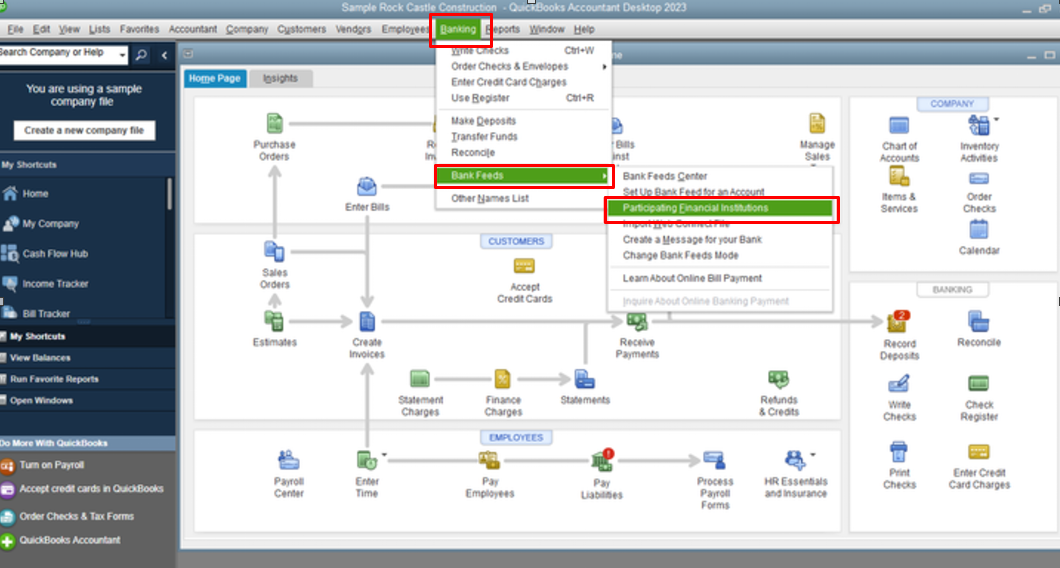
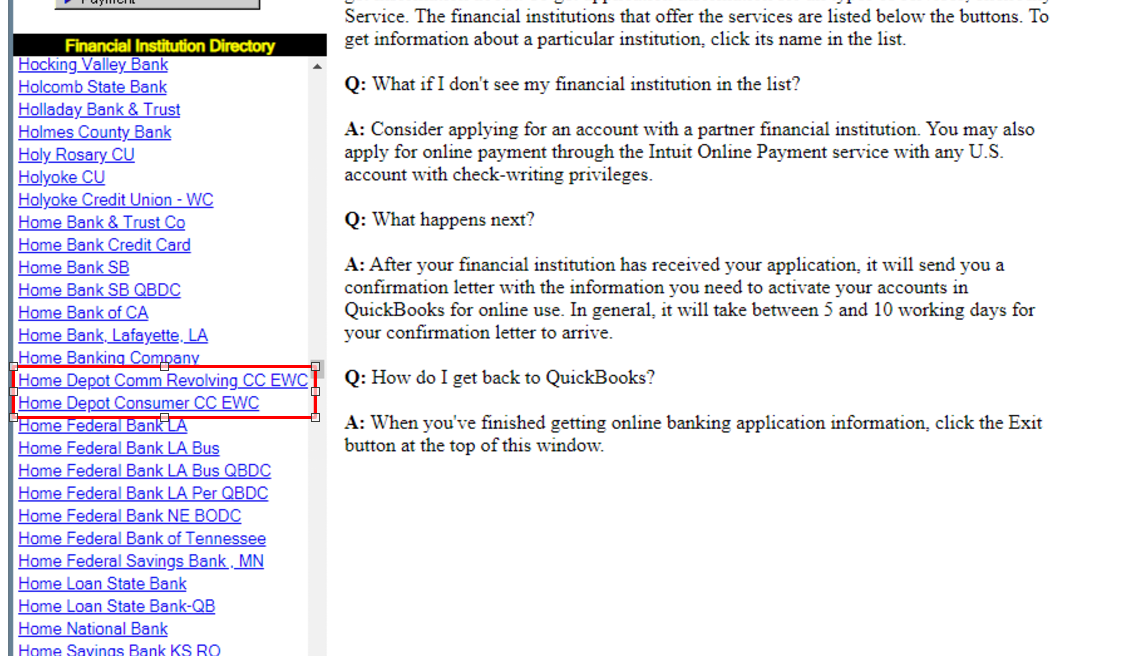
If your bank does not offer a direct connection, you have the option to download a .QBO file containing your company’s transactions from your bank or credit card. You can then import this file into QuickBooks to add transactions to your accounts.
If your bank offers Web Connect, please follow these steps:
Additionally, I recommend checking this article for more in-depth information about connecting using Web Connect: Set up or edit bank accounts for Bank Feeds in QuickBooks Desktop.
I'll be adding this guide to help you review and categorize banking entries in your account: Add and match Bank Feed transactions in QuickBooks Desktop. Once ready, you can start reconciling them to make sure your accounts match your bank and credit card statements.
Let me know if you have further questions about managing your banks in QBDT. We'll be right here to help you any time.
Yes, Thank you.
I am aware of the two types that are offered but this does not tell me which of the two when going into bank feeds I select for the Commercial credit card.
Please be specific
You can reach out to your bank services to specify which credit card account you'll integrate with QuickBooks, jmizani1.
As QuickBooks Desktop (QBDT) depends on the transactions downloaded from the Home Depot Commercial Card, we're unable to suggest what specific account is available when syncing your bank from QBDT.
However, you can consult your financing services to ensure certain integration to your account is accurate and how these entries are brought in from your Home Depot credit card.
Whenever you're ready to sync your bank, refer to the detailed steps mentioned by ArielI above.
I'll also include this reference for additional guidance: Set up or edit bank accounts for Bank Feeds in QuickBooks Desktop.
Once everything looks good, review your transactions and categorize them. Then, reconcile your account to ensure the accuracy of your books.
If anything comes to mind, please share them with us in the comments below. Keep safe.
I use online version, but probably same issue with desktop. I believe issue is with the communication between QuickBooks and Home Depot system. QuickBooks is always doing software updates and sometimes those updates cause communication issues with the bank systems. Usually it gets fixed same day or within a few days, however, Home Depot is an ongoing issue and theirs can last longer than a few days down. Also I lost my ability to bring up statements directly through QuickBooks when I was able to before.
QuickBooks software engineers should be alerted to this so they can contact them and see what they can do to resolve the conflicts.
I do not belive any of the attempt responses from QB actualy tried to login to experience the issue themselves.
The way they keep copying and pasting a response from their " costumer service manual" is some what disrespectfull with your clients.
this is being going for years now
However it seems that the issue lies with CITI - although all it seems to be needed is that QB update or add the current URL used by city. - but even though still a maybe.
1- QB ofer for ProXtra and Commercial Clients the same address: https://www.homedepot.com/c/Credit_Center
if yoiu click on it, or go to it in your browser it will take you there... HOWEVER
CITI will redirect you to : https://www.retailservicescommercial.citi.com/USCRSF/CMLSVC/index.html?siteId=PLNP_HOMEDEPOT#pro/ema... for Commercial accounts or https://www.retailservicescommercial.citi.com/USCRSF/CMLSVC/index.html?siteId=PLCR_HOMEDEPOT&partner... for ProXtra Accounts.
either way one might need reenter email confirmation - What QB although is capable to add to their login process - is not availible as part of the current process for HD credit cards (any of them)
so,
QB need to update the url and have individual ones for ProXtra and Commercial THEY ARE NOT THE SAME. And update their login process to alow the " reverification" step that CITI requires from time to time.
But none of the before mentioned methods will work simply becouse the URL's are not the same.
Not a viable solution


You have clicked a link to a site outside of the QuickBooks or ProFile Communities. By clicking "Continue", you will leave the community and be taken to that site instead.
For more information visit our Security Center or to report suspicious websites you can contact us here


