Get 50% OFF QuickBooks for 3 months*

Buy now
cancel
Showing results for 
Search instead for 
Did you mean: 
Announcements
Simplify payday and set payroll to run automatically on QuickBooks.Explore QuickBooks Payroll
SabrinaDQP
Level 1

My role keeps changing from Administrator to Payroll Manager. Is there somewhere else that my account needs to be updated to keep it set to Administrator?

I need to be an "additional" Administrator, not the Primary Admin. The other Admin keeps changing it back to Admin but when I log out and back in the system reverts back to Payroll Manager.

1 Comment 1
GebelAlaina_M
QuickBooks Team

My role keeps changing from Administrator to Payroll Manager. Is there somewhere else that my account needs to be updated to keep it set to Administrator?

Hello, @SabrinaDQP. It seems the system is not saving your updated role as intended. This can sometimes happen due to syncing issues or permission conflicts. To resolve this, have the Primary Administrator remove you as a user from the Manage users page by clicking the dropdown arrow next to Edit, then re-invite you using the same or a different email address.
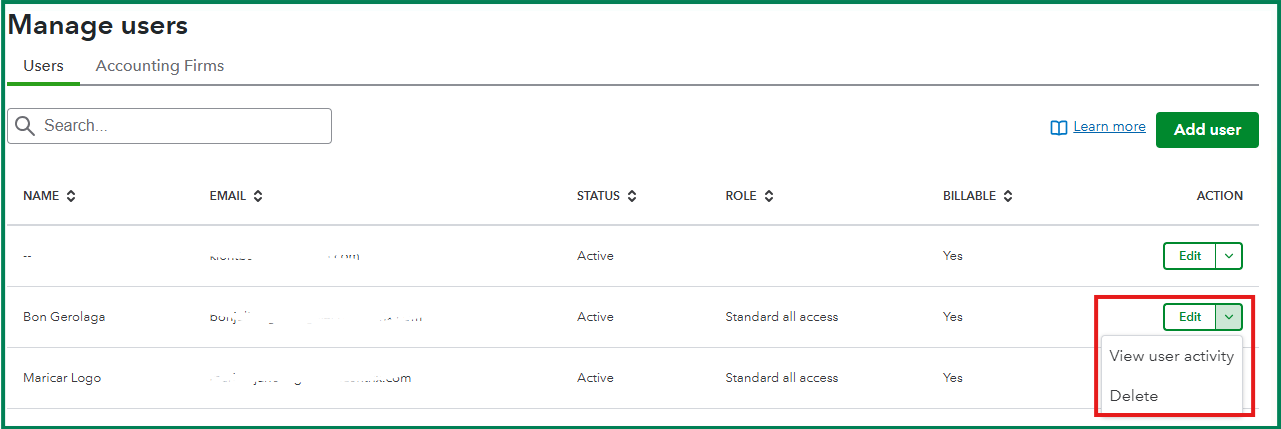

When re-adding you, the Primary Admin can assign you the Administrator role during the initial invitation process.

Feel free to reach out again if you have any other concerns. I'm always glad to help!

Need QuickBooks guidance?
Log in to access expert advice and community support instantly.

Need to get in touch?

Contact us