Turn on suggestions
Auto-suggest helps you quickly narrow down your search results by suggesting possible matches as you type.
Showing results for
Get 50% OFF QuickBooks for 3 months*
Buy nowHi,
There is a new interface for managing accounts in the chart of accounts.
This new interface is an improvement over the old one but you CANNOT SEARCH BY ACCOUNT NUMBER when configuring a parent account.
Our company has 1000's of accounts so it makes it almost impossible to use without being able to search by account number.
All other account form inputs allow autocomplete by account number.

Hello, dustinh.
I personally like the QuickBooks Online cause it's very convenient. QuickBooks, keep enhancing our features and the software to help us improve your experience and the features of the program.
Let's go ahead with the setting and ensure we have the account numbers turned on in Gear Icon and then Account and Settings and Advanced.
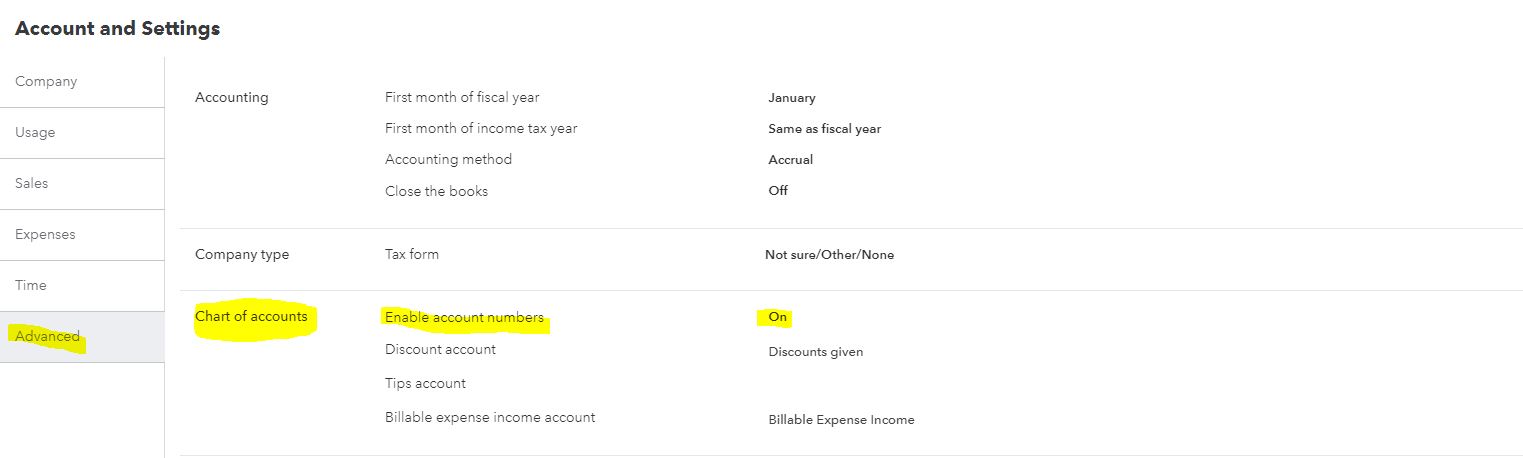
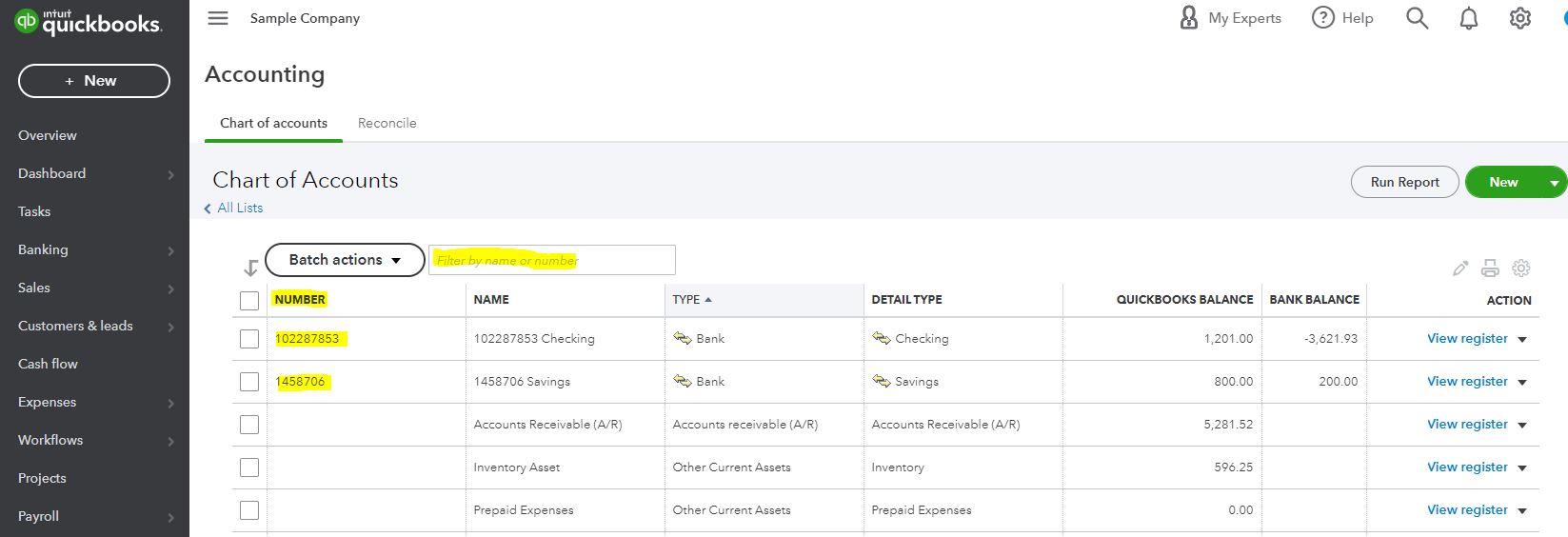
For future reference about the accounts in QuickBooks Online, read through these articles:
I'll be right here to continue helping if you have any other concerns or questions about QuickBooks. Assistance is just a post away. Have a great day ahead.
You misunderstood what I am saying.
Please see attached screenshot that explain the problem with the new account edit panel.
In other fields, auto-complete searching by account number works (for example the filter on the chart of account list itself)
Good afternoon, @dustinh.
Thanks for coming back with screenshots about your issue. I can share some insight into search by account number when creating a new account in QuickBooks Online.
I can see how beneficial this would be for you and your business. However, as of now, the new interface doesn't allow to search by account number.
I recommend submitting this feedback to our Product Developers so they can consider improving the interface and bring back the old available searches. Review our Blog site to keep up with what's new in the system.
I hope this helps answer your question. Don't hesitate to reach back out if you have any other concerns. Bye for now!
Are you sure this is not a bug?
The previous interface (the one that existed as of last week) did search by account number. This new interface was introduced and does not allow search by account number. I think it's just an oversight by the product team.
Hello, Dustin.
Thanks for getting back to us. I'd like to reiterate some things about the account number search when setting up a parent or a sub-account.
Let's take this to our developers and have them take a look at this change. To reiterate and as pointed out by my colleague, we'll want to send feedback to them by clicking on the Gear icon, then selecting Feedback.
They'll check your input and review it for any future changes on the Chart of Accounts page (and QuickBooks Online as a whole).
In the meantime, we'll want to consider searching for the names on the new interface when setting up a parent or a sub-account.
Need to run reports for a data of all the entries on accounts? We can check this article for a guide on how to run basic reports, and how to customize them: Run reports in QuickBooks Online.
I'm all ears if you have more concerns about your Chart of Accounts, recent changes, and other features in QuickBooks. I'm here to help.


You have clicked a link to a site outside of the QuickBooks or ProFile Communities. By clicking "Continue", you will leave the community and be taken to that site instead.
For more information visit our Security Center or to report suspicious websites you can contact us here


